
Overview of Key management
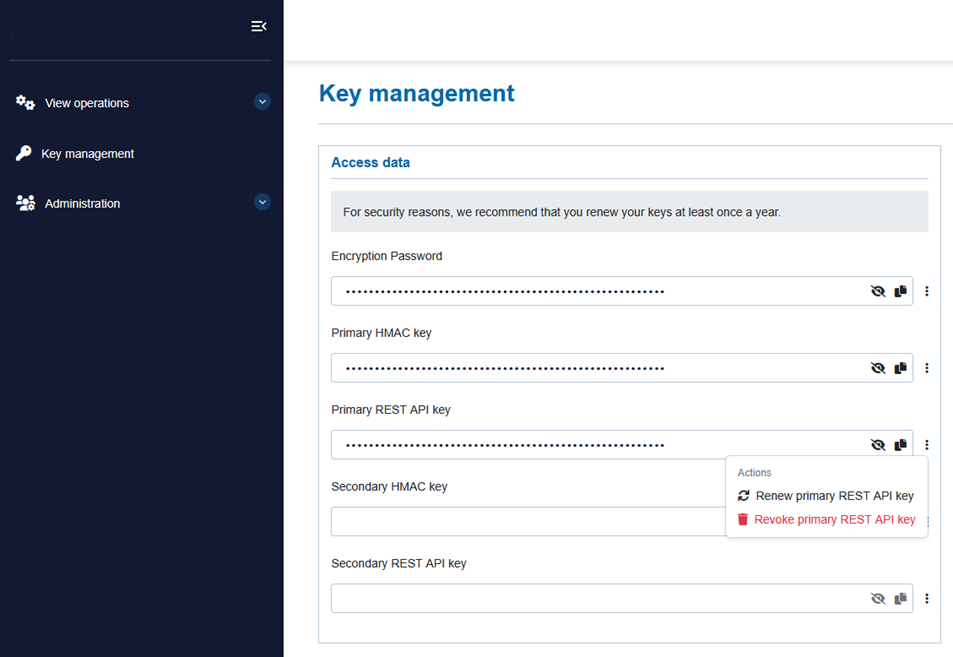
Once enabled to edit API Credentials, you can
- create a new key for empty fields
Status Description Active The key has been generated, is valid and can be used immediately for API access Use case temporary migrations or before key rotation - renew an existing key
Status Description Active The key has been updated, is valid and can be used immediately for API access Use case if compromise is suspected or without key rotation - revoke an existing key
Status Description Inactive The key has been immediately deactivated and is irretrievably deleted for API access Use case temporary migrations or after key rotation
uses API key sets for your MerchantID.
Legacy API (Both used in legacy API)
Encryption Password
Primary HMAC key
REST API (Primary HMAC Key is shared and optionally used for Enhanced Webhook in REST API)
Primary HMAC key
Primary REST API key
Double run in REST API (Both optionally used for double run in REST API)
Secondary HMAC key
Secondary REST API key
In case you have integrated with our REST API you can use two key sets in parallel to rotate keys without downtime.
Using two key sets in parallel is called double run. Double run allows you to switch your systems from one key to another without interrupting live traffic.