
Payment page customization is achieved using the template object.
With custom fields, merchants can utilize customizable fields that can store additional data or display specific information on a payment page.
A chaque page de paiement, un template
For each payment page, a template is used.
There are 2 types of AXEPTA payment pages that can be customized using custom fields.
| Nom | API |
|---|---|
| Hosted Payment Page | /payments/sessions |
Card Payment form (Payssl) | /payments |
List of customFields
Parameter | Format | CND | Description |
|---|---|---|---|
template.customFields.customField1 | ans...50 | O | Amount and Currency |
template.customFields.customField2 | ans...50 | O | Order Reference |
template.customFields.customField3 | ans...256 | O | Merchant Logo Merchant Logo URL (recommended size: 200x100 pixels) |
template.customFields.customField4 | ans...50 | O | Invoice Reference |
template.customFields.customField5 | ans...50 | O | User Information |
template.customFields.customField6 | ans...50 | O | Delivery Address |
template.customFields.customField7 | ans...50 | O | Billing Address |
template.customFields.customField8 | ans...50 | O | Customizable Field Name (header) (merchant-defined) |
template.customFields.customField9 | ans...50 | O | Custom Field Value (related to field 8) |
template.customFields.customField14 | ans...50 | O | This option enables the iframe implementation in the merchant's payment page Accepted value: "iframe" |
The customFields allow displaying text with line breaks. In this case, you need to add the character "|" in the customField content to indicate a line break.
Example: CustomField6 = Line 1|Line 2|Line 3
The customFields that accept the "|" character are CustomField4, CustomField5, CustomField6, CustomField7, and CustomField9.
...
	"template": {
        "customFields": {
            "customField1": "20.00 €",
			"customField2": "merchantReference",
            "customField3": "https://placehold.co/200x100/png",
			"customField4": "invoice29351925733931",
            "customField5": "+33600000000|john.doe@bnpparibas.com",
			"customField6": "41 Rue de Valmy|93100 Montreuil",
            "customField7": "41 Rue de Valmy|93100 Montreuil",
			"customField8": "Discount",
            "customField9": "FRI_50|SUM_25"
        }
	},
...
Example of Hosted Payment Page with customFields
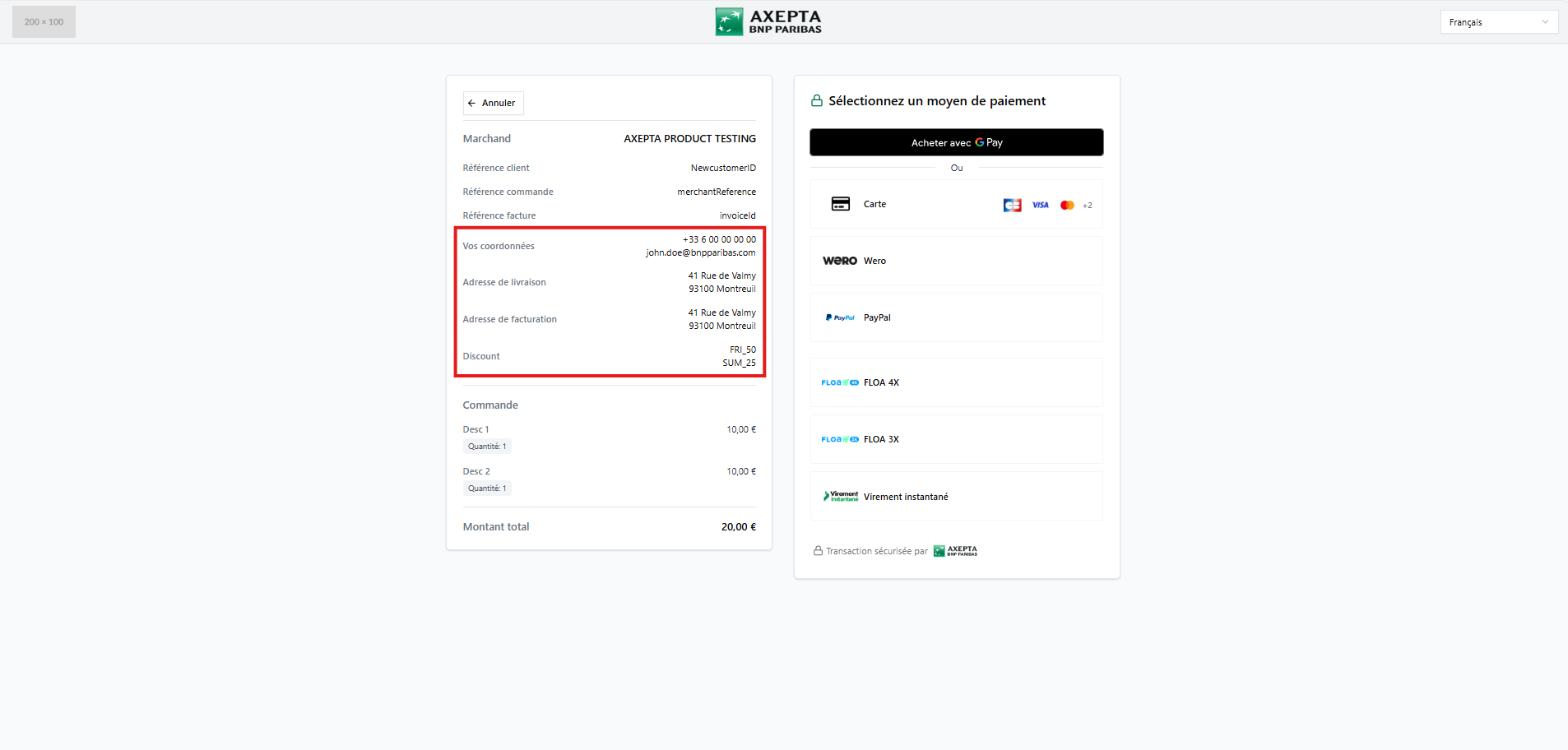
...
"paymentMethods": {
        "type": "CARD",
        "card": {
            "template": {
        		 "customFields": {
           		 	"customField1": "20.00 €",
					"customField2": "merchantReference",
            		"customField3": "https://placehold.co/200x100/png",
					"customField4": "invoice29351925733931",
            		"customField5": "+33600000000|john.doe@bnpparibas.com",
					"customField6": "41 Rue de Valmy|93100 Montreuil",
            		"customField7": "41 Rue de Valmy|93100 Montreuil",
					"customField8": "Discount",
            		"customField9": "FRI_50|SUM_25"
            }
       }
    }
}
...
Example of Card Payment form with customFields
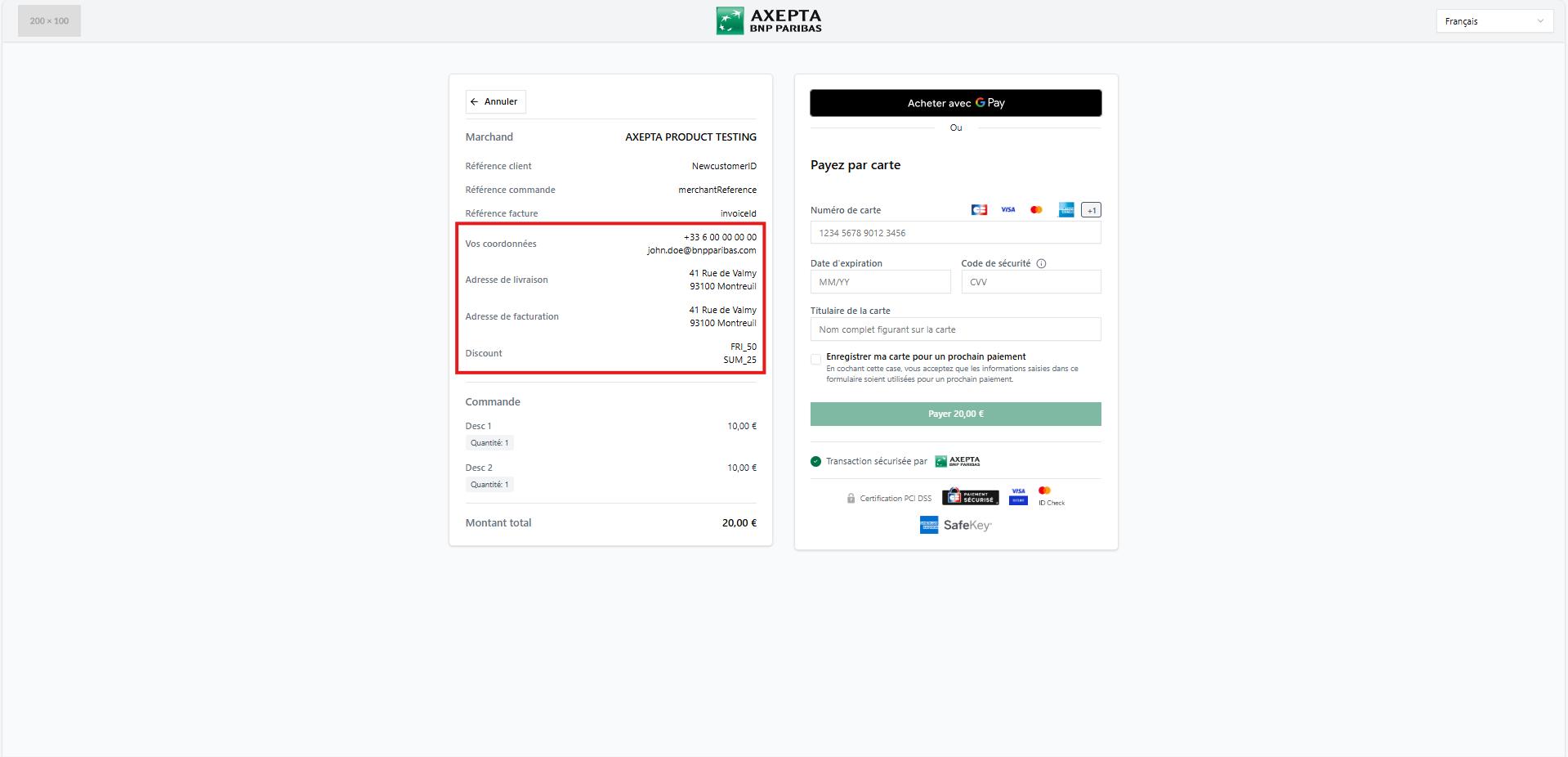
CustomField14 on the Hosted Payment Page
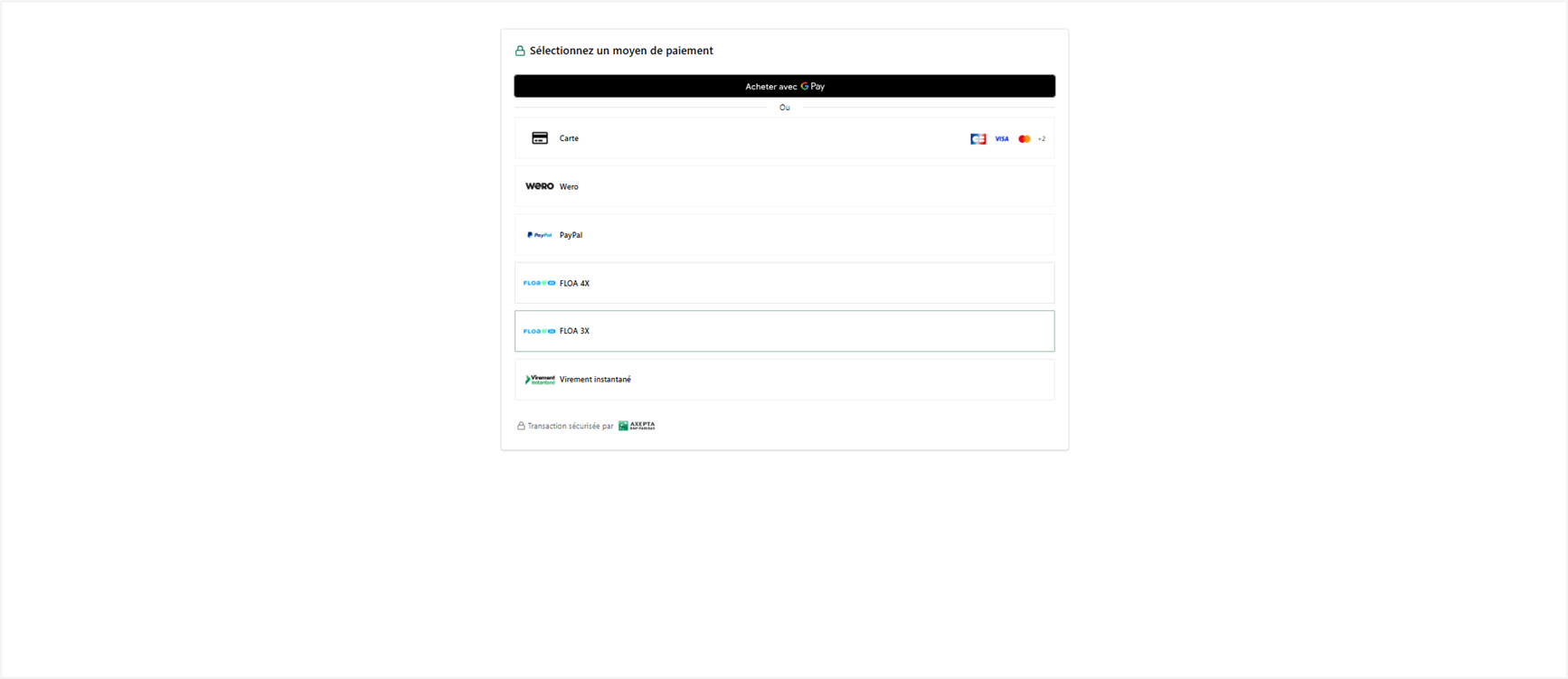
When the parameter customField14 = "iframe" is set on the Hosted Payment Page, all other custom fields become invisible.
...	"template": {
        "customFields": {
            "customField1": "20.00 EURO",
			"customField2": "merchantReference",
            "customField3": "https://placehold.co/200x100/png",
			"customField4": "invoiceId",
            "customField5": "+33600000000|john.doe@bnpparibas.com",
			"customField6": "41 Rue de Valmy|93100 Montreuil",
            "customField7": "41 Rue de Valmy|93100 Montreuil",
			"customField8": "Discount",
            "customField9": "FRI_50|SUM_25",
			"customField14": "iframe"
        }
	},
...
Example of Hosted Payment Page with the customField14
CustomField14 on the Card Payment form (Payssl)
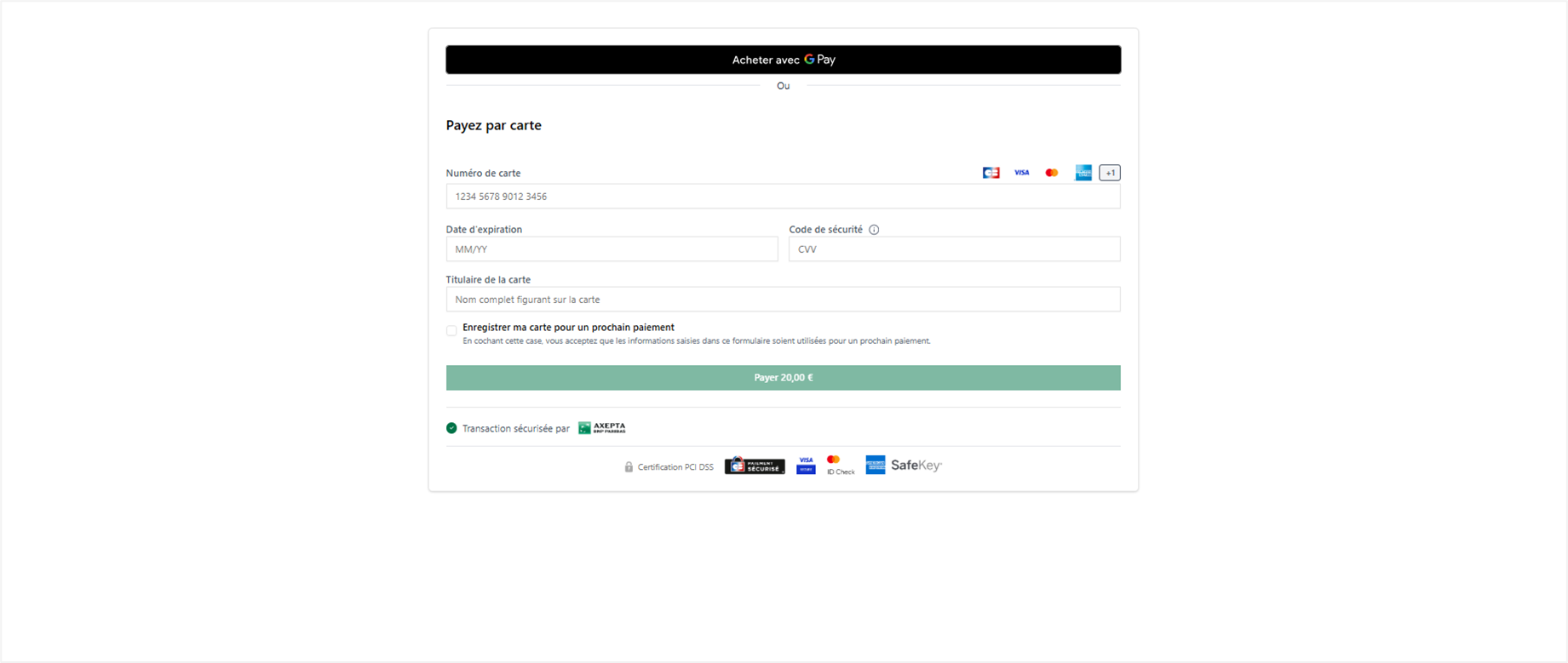
When the parameter customField14 = "iframe" is set on the Hosted Payment Page, all other custom fields become invisible, except for customField1.
...
"paymentMethods": {
        "integrationType": "HOSTED",
        "type": "CARD",
        "card": {
            "template": {
        		 "customFields": {
           		 	"customField1": "20.00 €",
					"customField2": "merchantReference",
            		"customField3": "https://placehold.co/200x100/png",
					"customField4": "invoice29351925733931",
            		"customField5": "+33600000000|john.doe@bnpparibas.com",
					"customField6": "41 Rue de Valmy|93100 Montreuil",
            		"customField7": "41 Rue de Valmy|93100 Montreuil",
					"customField8": "Discount",
            		"customField9": "FRI_50|SUM_25",
					"customField14": "iframe"
            }
       }
    }
...
Example of Card Payment form with the customField14
Other Dynamic Parameters (Language, Payment Method Selection)
Additional parameters are available to merchants and can be transmitted unencrypted:
Language | a2 Enum | O | Language for Payment Page | Language code of the merchant's payment page :
When not mentioned, the language is French by default. If the user changes the language from the language selector, the chosen language will be displayed during the next visit. |
allowedPaymentMethods | Enum | O | Payment Methods to Display on Hosted Payment Page | This parameter indicates which payment methods to display on the payment selection page. If this parameter is not used, the merchant's default configuration is used to display the authorized payment methods. Possible values can be taken from the allowedPaymentMethods column in the payment methods table (see the Parameter Value Definitions section at the bottom of the page). |
subType | Enum | O | Parameter to indicate the card type Display on Card Payment Form | This parameter, derived from the paymentMethods.card objects, indicates the type of card brand to display on the card payment form. Info It is not possible to precisely specify the type of card to display on the payment method selection page (Hosted Payment Page - HPP). |
Parameter Value Definitions
«allowedPaymentMethods» parameter
Below are the available payment methods and the corresponding values to be specified in the «allowedPaymentMethods» parameter:
Payment Method | Parameter Value for "allowedPaymentMethods" in API Call to /payments/sessions |
Card *See below the list of card brands | CARD |
WERO | WERO |
APPLEPAY | APPLEPAY |
| GOOGLEPAY | GOOGLEPAY |
| PAYPAL | PAYPAL |
| FLOAPAY | FLOAPAY |
BANCONTACT | BANCONTACT |
INSTANEA | INSTANEA |
«subType» parameter
Card brands to specify in the paymentMethods.card objects
This table lists the exact spelling of different card brands to be specified in the subType parameter of paymentMethods.card objects:
| Brand | (paymentMethods.card) "subType" parameter value for API calls to /payments/sessions or /payments |
| Carte Amex | AMEX |
Carte CB | CARTESBANCAIRES |
UnionPay International (UPI) | CUP |
Diners | DINERS |
Discover | DISCOVER |
JCB | JCB |
Carte MasterCard | MasterCard |
Carte VISA | VISA |
...
    "allowedPaymentMethods" :  [
      "CARD"
    ],
    "paymentMethods": {
        "card": {
        "subType":[
            "CARTESBANCAIRES",
            "VISA"]
       }
  }
...