
The “View API Credentials” tab is located in the Merchant portal side menu.
It allows the merchant to view and retrieve the keys required for integrating and using payment API.
The displayed credentials are specific to each merchant and are used to secure communications between the merchant’s system and the Axepta BNP Paribas platform.
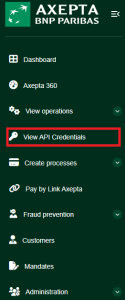
Overview of API Credentials Access
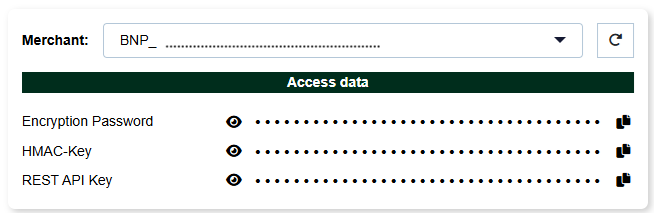
In the “Access Data” section, three types of keys are displayed:
- Encryption Password
- Used for encrypting sensitive data exchanged between the merchant and the platform.
- HMAC Key
- Used to sign and verify the integrity of API messages.
- REST API Key
- Used for authentication when calling the REST services exposed by the platform.
Features
- Display icon
 : temporarily reveals the hidden value of the key.
- Copy icon
 : copies the key to the clipboard for immediate use.
- Merchant selector: allows selection of the merchant (useful in multi-account (MIDs) management).
- Refresh button
 : reloads the keys of the selected merchant.
Export & Security
- Keys cannot be exported as a file; they must be copied manually.
- For security reasons, keys are hidden by default.