
The card payment form is used when the merchant wants to offer a simplified and secure payment solution for card transactions.
This method is ideal for e-commerce sites that want to integrate a fast payment solution that complies with security standards.
Summary
1. Key Advantages
- Optimized User Experience: Provide your customers with an intuitive, secure, and responsive payment interface
Security and Compliance with Standards: Comply with current regulations through Axepta BNP Paribas's management of customer sensitive data, significantly reducing your responsibilities PCI-DSS compliance and costs related to PCI-DSS compliance.
Flexibility: Allow customers to pay with various cards
2. Payment Flow
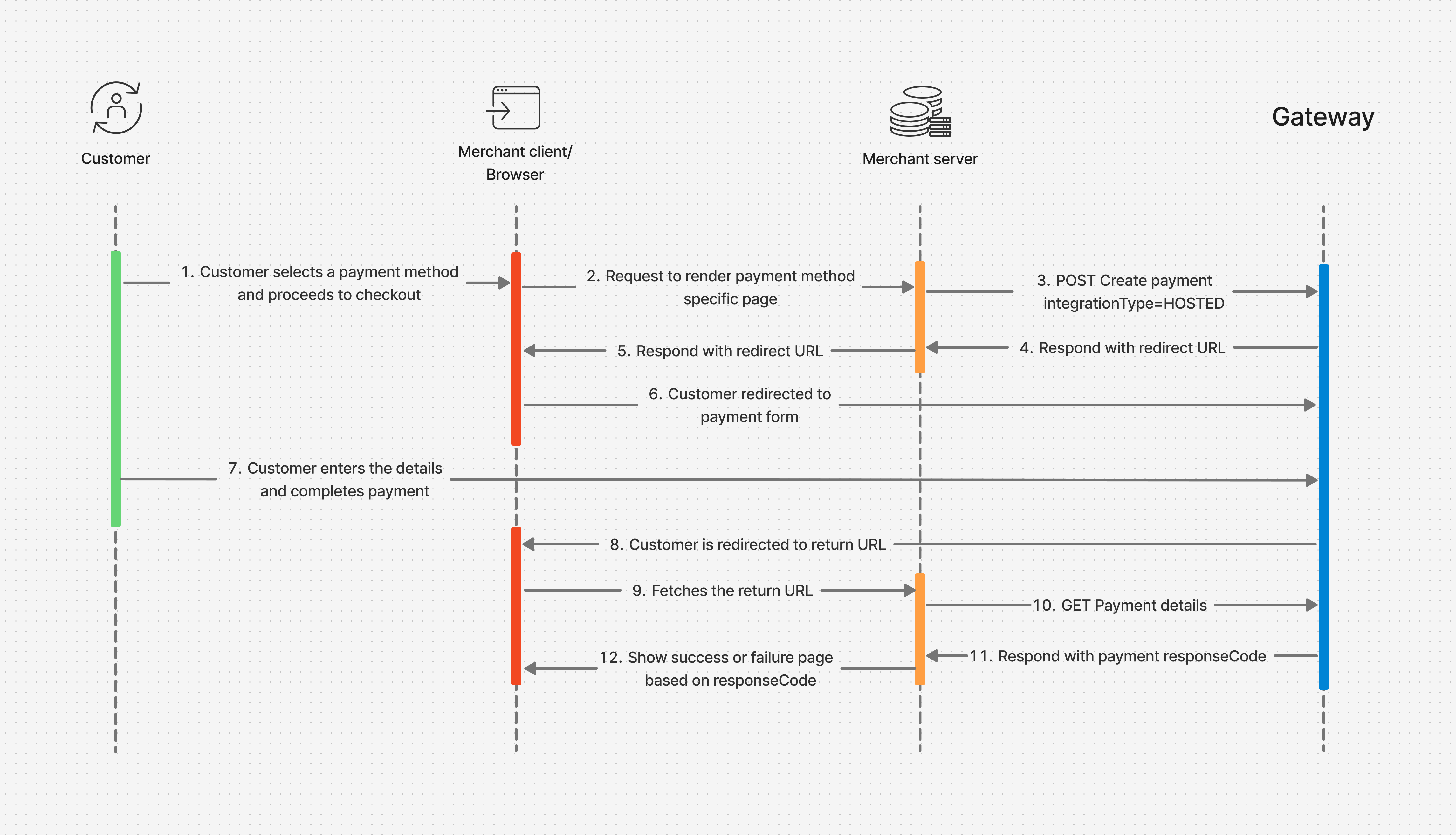
The customer proceeds with payment on your online store:
Your frontend requests the payment page from the backend.
- Your backend makes a payment creation call with '
paymentMethods.integrationType=HOSTED'to Axepta BNP Paribas. Axepta BNP Paribas responds with HTTP 202 status code and a redirect URL to your backend.
Your backend orchestrates the browser to redirect the user interface to the redirect URL.
The customer is redirected to the payment form hosted by Axepta BNP Paribas.
The customer enters details and completes the payment.
At the end, the customer is redirected to the return URL you submitted during the payment creation call (urls.return) with the payId in the query parameters.
The browser fetches the return URL hosted by your backend.
The backend makes a payment details GET call with the payId to fetch the payment response code.
Axepta BNP Paribas responds with the payment response code along with other parameters.
Your backend returns a success or failure page based on the payment response code.
3. Create Payment
(API /payment Swagger Documentation: Create payment )
Simple payment
Technical Connection Data
Technical connection data must be passed in the HTTP headers of the REST request:
- Content-Type
The payload type: data must be passed in a JSON payload.
Content-Type: application/json - Authorization data received during the OAuth-v2 authentication step
This includes the token type and JSON Web Token (JWT). They must be specified in the 'Authorization' header
Authorization: <token_type> <YOUR_JWT>
- Idempotency Id
Essential for detecting possible HTTP repetitions.
Use the 'Idempotency-Key' header and generate a uuid-v4 as the value
Idempotency-Key: "8f35cb16-2f05-4aa1-85cf-b1e41ee7aec9"
Données minimales
Pour initier le paiement, les données minimales nécessaires sont:
- l'identifiant de la transaction coté marchant: 'transId'
- le montant et la devise de la transaction: objet 'amount'
- composés des données 'curreny' et 'value'.
- le montant doit toujours être exprimé dans la plus petite unité de la devise associée. (par ex, le centime d'euro)
- l'identification du client: objet 'customerInfo' composé à minima
- de l'e-mail du client: 'email'.
- Il est fortement conseillé de renseigner l'identification du client sur le site marchant: 'merchantCustomerId'. Cette donnée est indispensable à la fonctionnalité 'One-Click'.
- les données de la commande: objet 'order'
- Au moins une des deux données suivantes: le numéro de commande 'merchantReference', ou le numéro de facture 'invoiceId' générée sur le site marchant.
- il est conseillé de renseigner les 2.
- les urls de retour: objet 'urls'
- obligatoirement les adresses de 3 urls de retour: return, cancel, webhook
- le type de paiement souhaité: objet 'paymentMethods'
- Il faut préciser si le paiement est hébergé par Axepta BNP Paribas Online, ou traité entièrement coté marchant: 'integrationType'
- et il faut donner le type de paiement souhaité: 'type'
To initiate the payment, the minimum required data are:
Transaction identifier on the merchant side: 'transId'
Transaction amount and currency: 'amount' object
- Composed of the data 'currency' and 'value'
- The amount must always be expressed in the smallest unit of the associated currency (e.g., EUR cents)
Customer identification: 'customerInfo' object composed at minimum
- Of the customer's email: 'email'
- It is highly recommended to provide the customer identification on the merchant site: 'merchantCustomerId'. This data is essential for the 'One-Click' functionality.
Order data: 'order' object
- At least one of the following two data points: the order number 'merchantReference', or the invoice number 'invoiceId' generated on the merchant site.
- It is recommended to provide both.
Return URLs: object 'urls'
- Mandatory addresses of 3 return URLs: return, cancel, webhook
Desired payment type: 'paymentMethods' object
- It must be specified whether the payment is hosted by Axepta BNP Paribas Online, or processed entirely on the merchant side: 'integrationType'
- And the desired payment type must be provided: 'type'
curl -i -X POST \
  https://test.paymentpage.axepta.bnpparibas/api/v2/payments \
  -H 'Authorization: <token_Type> <YOUR_JWT>' \
  -H 'Content-Type: application/json' \
  -H 'Idempotency-Key: "8f35cb16-2f05-4aa1-85cf-b1e41ee7aec9" \
  -d '{
    "transId": "95330876-67ae-4949-a11c-b9a29257831b",
 	"amount": {
    	"currency": "EUR",
    	"value": 1500
    },
    "customerInfo": {
        "email": "john-doe@email.com"
    },
 	"order": {
    	"merchantReference": "order7811",
        "invoiceId": "invoice10240203569454"
    },
 	"urls": {
 		"return":"https://myProcessingServer.net/myApi/success.php?transId=95330876-67ae-4949-a11c-b9a29257831b",
		"cancel":"https://myProcessingServer.net/myApi/cancel.php?transId=95330876-67ae-4949-a11c-b9a29257831b",
 		"webhook":"https://myBackOfficeServer.net/webhook.php"
    },
    "paymentMethods": {
        "integrationType": "HOSTED",
        "type": "CARD"
	}
}'
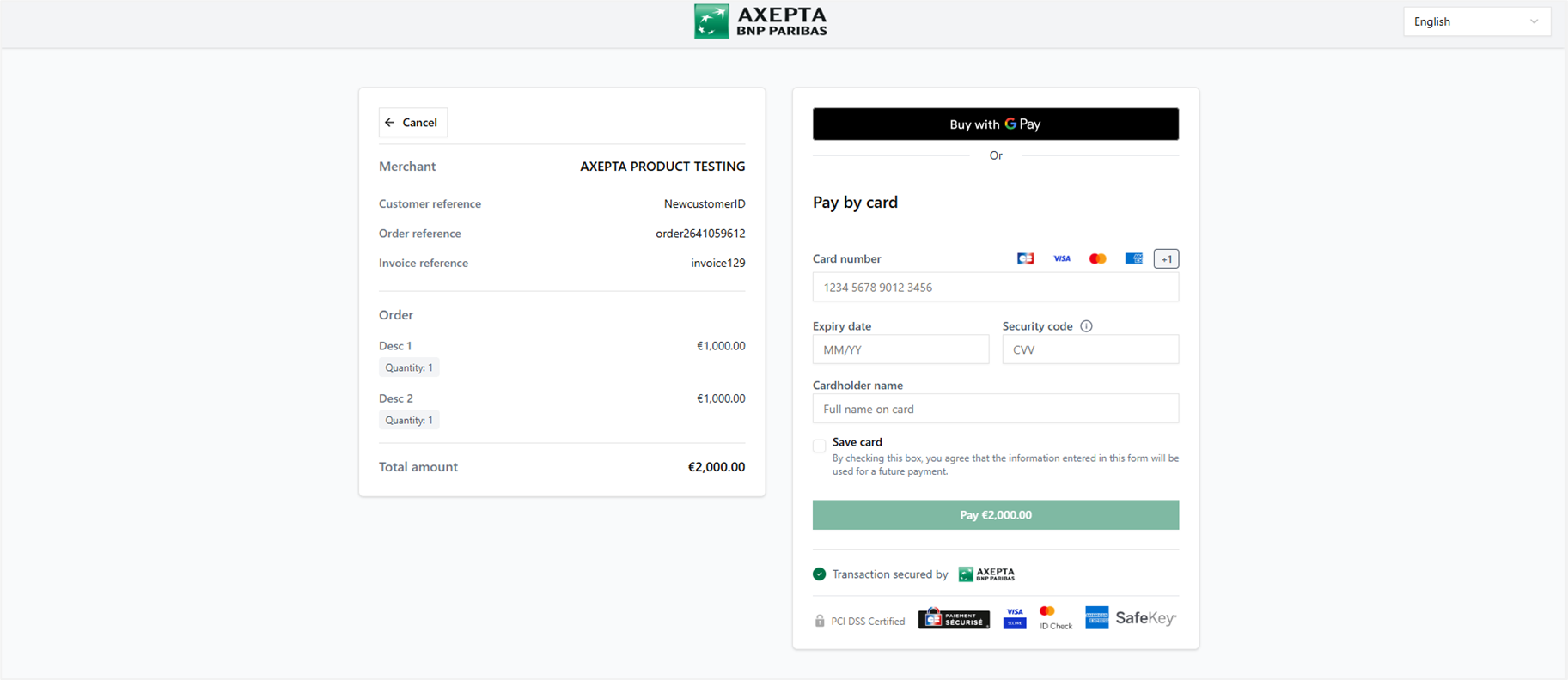
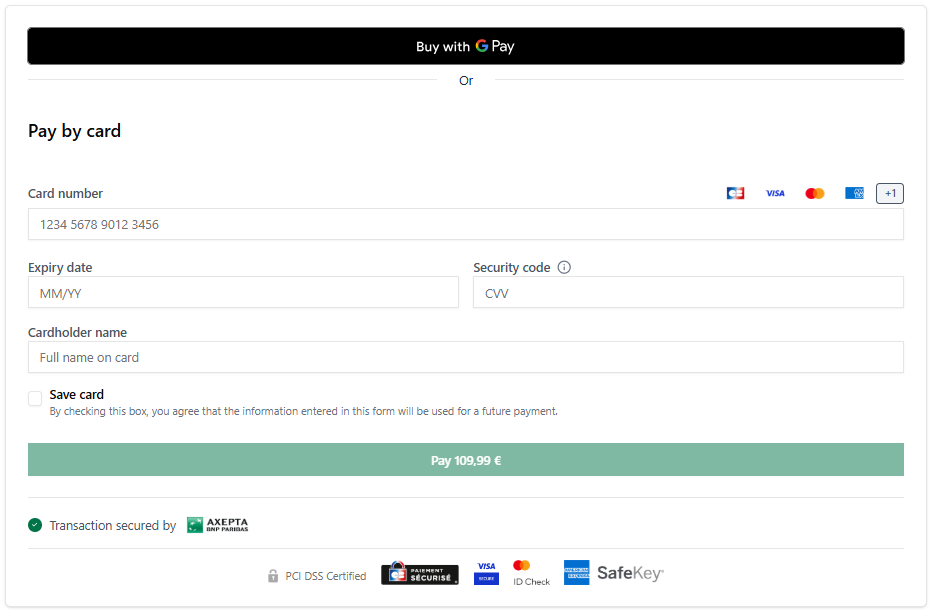
Example of card payment form
One-Click Payment / Wallet
To process the One-Click feature, it is necessary to provide the merchant's customer identifier.
In the 'customerInfo' object, you must send the 'merchantCustomerId' parameter.
...
     "customerInfo": {
        "email": "john-doe@email.com",
		"merchantCustomerId": "id-8803"
    },
...
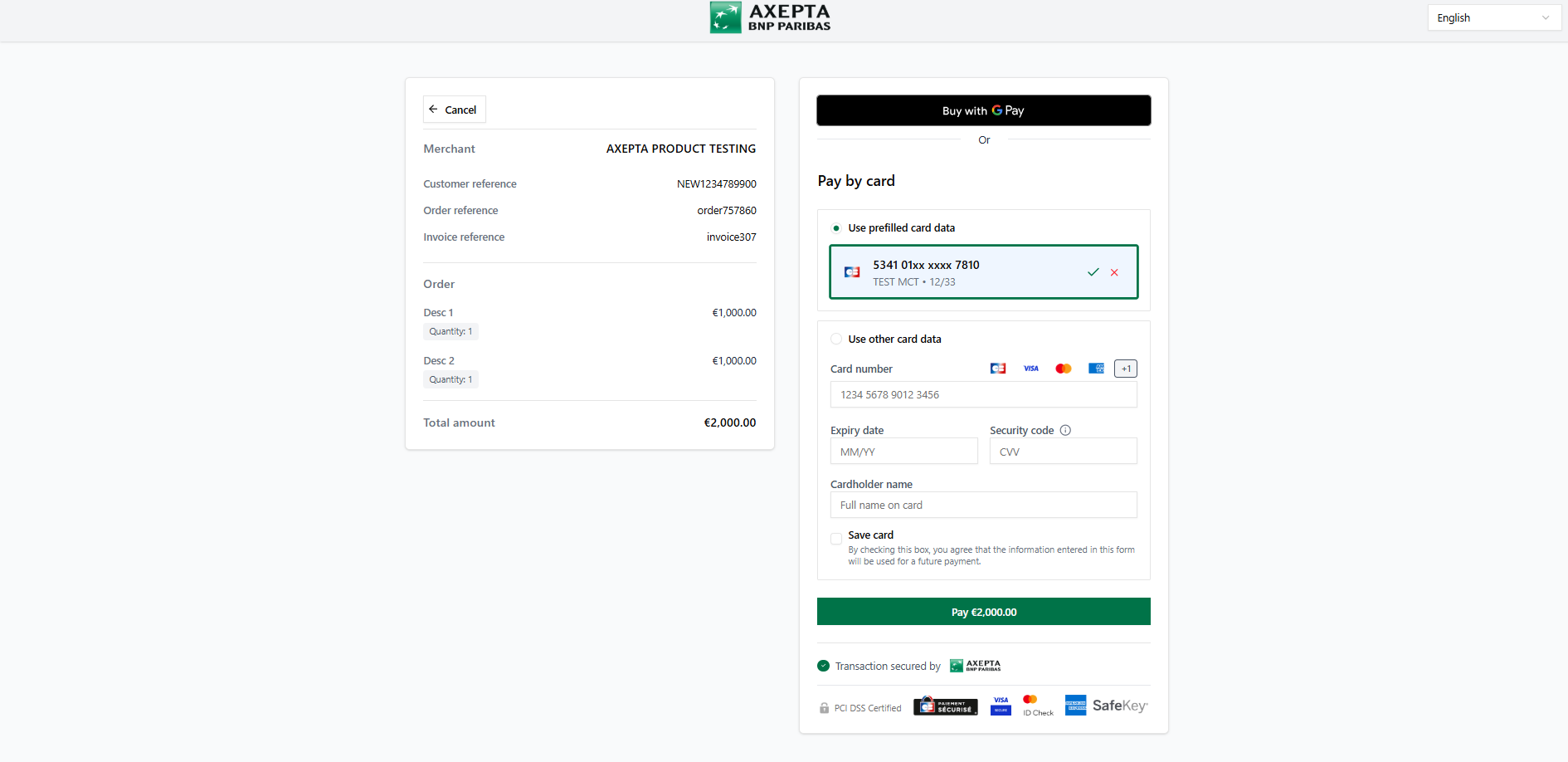
Example of a payment page with the One-Click feature
Card saving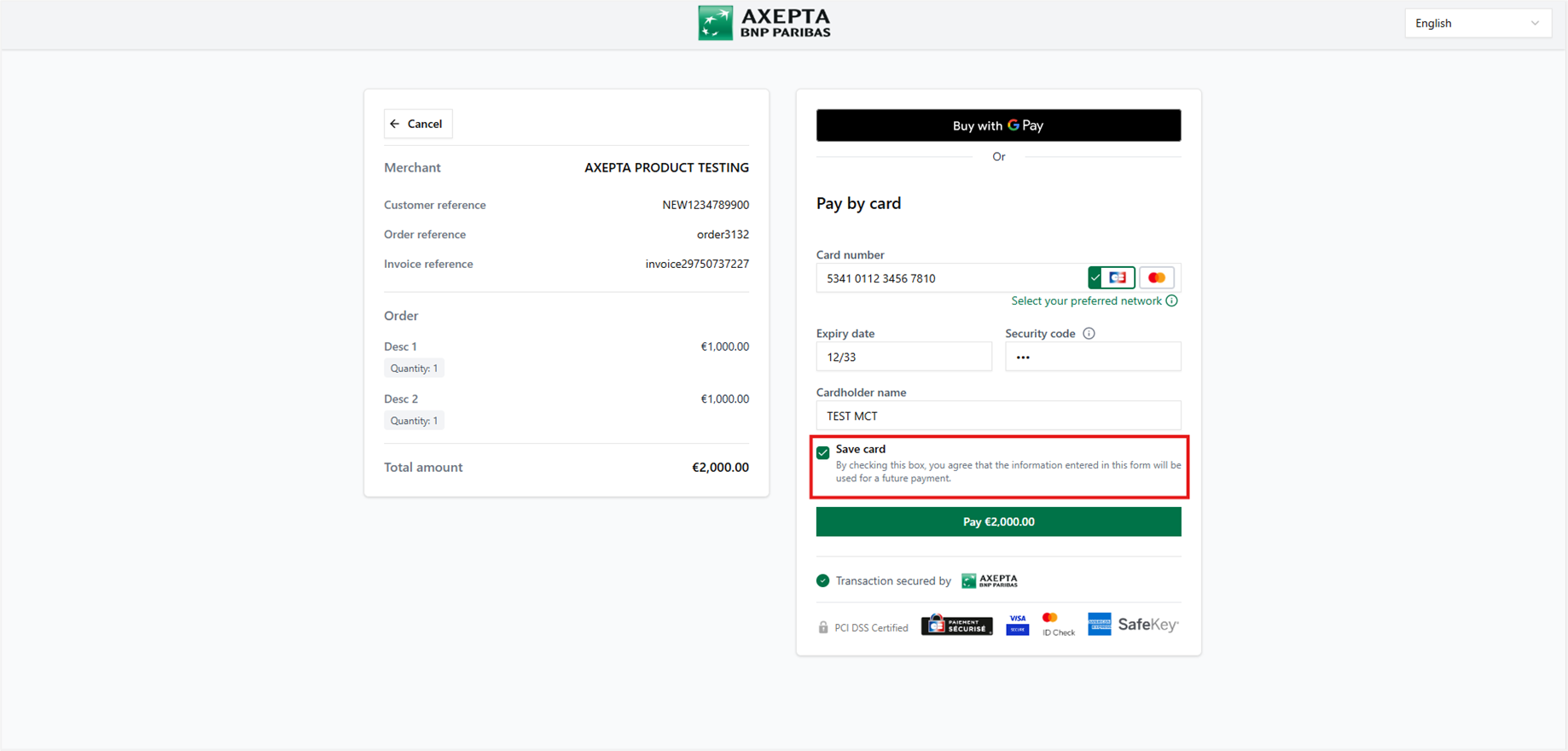
Card reusing
iframe Payment
To open the payment page in a separate iframe, you need to use the object: 'template'. Set the field 'customField14' with the value: "iframe".
The 'template' object allows you to customize the payment page.
See the doc: Checkout experience Customization
...
	"template": {
		"customFields": {
	    	"customField14": "iframe"
		}
	},
...
Example of a payment page displayed in a separate iframe
4. Recommandations
We recommend transmitting at least the following data:
- Transaction Identifier: The unique payment identifier
- Payment Amount: The amount to be paid by the customer.
- Currency: The currency used for the payment.
- Customer Identifier: The unique customer identifier - Allows the use of the One-Click/Wallet payment feature
- Email: The customer's email
- Order Identifier (order.merchantReference): The order identifier
- Invoice Identifier (order.invoiceId): The invoice identifier associated with this payment
Our complete guidelines are available here: https://axeptabnpparibas-docs.redocly.app/
5. Available brands
We offer the following payment methods tailored to your specific needs as well as those of your customers:
6. Fonctionnalités associées
Génération Automatique de la Référence End to End (RefNr) : Chaque transaction bénéficie d'une référence unique générée automatiquement.
Wallet : Offrez à vos clients une expérience de paiement fluide et sécurisée. Grâce à cette fonctionnalité, les clients peuvent enregistrer leurs cartes de manière sécurisée pour les transactions futures, ce qui rend les achats répétés plus rapides et plus faciles, améliorant ainsi le taux de conversion.
Contrôle des Doublons : Détectez et gérez les tentatives de paiement en double pour éviter les erreurs - Activation lors de la configuration de votre boutique ou via une demande au support
Email de confirmation : Axepta BNP Paribas peut envoyer une mail de confirmation de succès ou d'échec de paiement au client - Activation lors de la configuration de votre boutique ou via une demande au support