
Axepta Online offers daily reconciliation reporting (Settlement File).
The Settlement File provide different payment methods data by the merchant in order to set up reconciliation and reporting.
Clearing and settlement information is retrieved from individual payment service providers and acquirers.
The file is in ''Comma Separated Values'' (CSV) format.
This documentation explains the steps to recover the Settlement File.
This file recovery method requires the generation of SSH and PGP key pairs that will be used to:
- The establishment of a secure connection between the merchant's information system and the Axepta sFTP server.
- The reconciliation file decryption generated by Axepta.
Implementation steps
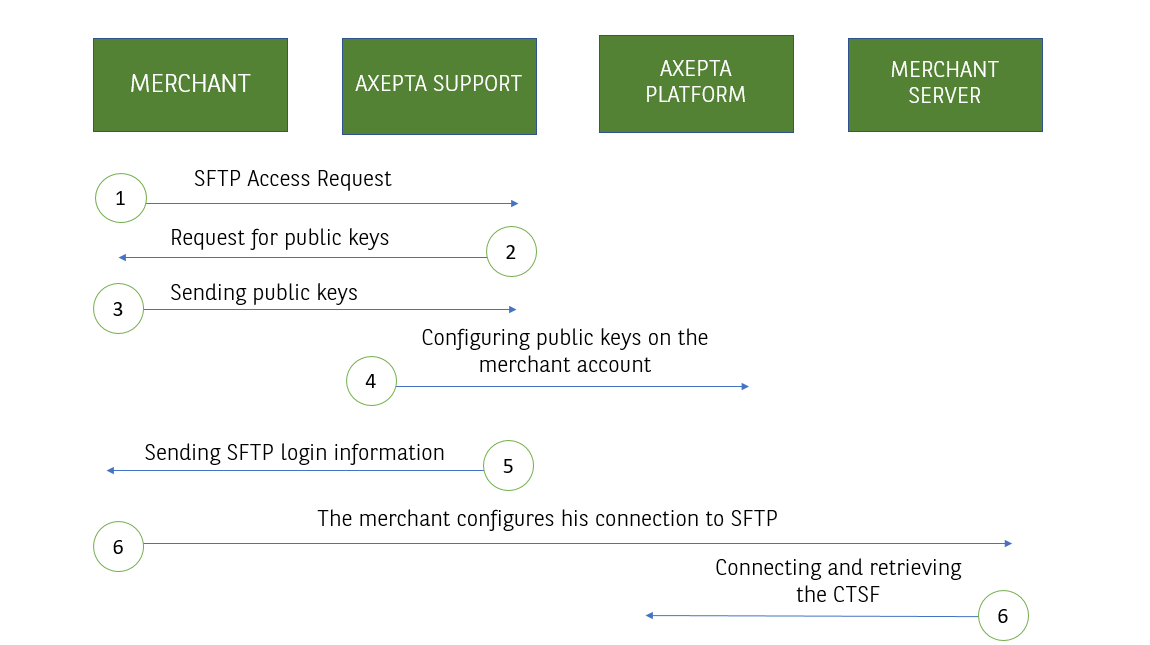
- The Merchant contacts Axepta Support to request the reconciliation file availability via sFTP.
- Axepta Support contacts the Merchant and asks it to send his SSH and PGP public keys.
- The Merchant creates his SSH and PGP key pairs. The merchant only submits his public keys to Axepta Support.
- Axepta Support set up the appropriate configuration.
- Axepta Support sent the Merchant Axepta sFTP connection data by mail.
- The Merchant establishes the connection between his information system and the Axepta sFTP, recovers the encrypted file and decrypts it.
Step details
Step 1: Sending the request to Axepta support.
The merchant send the sftp request by e-mail to Axepta support.
Step 2: Sending SSH and PGP public keys
In response, Axepta Support contacts the merchant by email so that he can send back SSH and PGP public keys.
This email also contains the Axepta Online public key which will be used only in case the merchant used batch export.
Example of a public key request template issued by Axepta Support
Please note the following information in order to set up reconciliation files via sFTP:
- Please find our public key attached.
- Please provide us with your PGP public key in .asc format (with an RSA length of at least 4096 Bit).
- Please send us a public SSH key in .ssh format (the command for creating an SSH key is as follows: ssh-keygen -b 4096 -t rsa).
It is necessary to assign an email address to your public PGP key as it will act as an identifier.
We recommend that you do not use a private email address but an email address from the company's domain.
We will complete the configuration of your account and send you your access data by e-mail after receiving your data.
Étape 3 : Génération des paires de clés SSH et PGP et envoi au support
Étape 3.1 : Génération des paires de clés
Le Marchand (son intégrateur ou son service informatique) génère des paires de clés SSH et PGP.
Les systèmes SSH et PGP utilisent des modes de cryptage dit asymétrique se caractérisant par l'utilisation d'une paire de clés.
Cette paire est composée :
- d'une clé de chiffrement appelée clé publique
- d'une clé de déchiffrement appelée clé privée
Utilisation des clés
- Les clés SSH sont utilisées pour sécuriser les échanges (inc. authentification) entre le système d'information du marchand et le serveur sFTP Axepta
- Les clés PGP sont utilisées pour crypter et décrypter le fichier de réconciliation
Prérequis:
- La commande pour la création d'une clé SSH se présente comme suit : ssh-keygen -b 4096 -t rsa.
- La clef PGP doit avoir une longueur RSA d'au moins 4096 Bit.
- La clef PGP doit être en format .asc
Étape 3.2 : Envoi au support
Le marchand envoie ses clés publiques SSH et PGP au Support Axepta, en précisant son MID.
Etape 4 et 5 : Configuration par le Support Axepta
Une fois cette opération terminée, un mail de confirmation contenant les identifiants de connexion au server Axepta est envoyé au marchand.
Exemple de retour mail :
La clé publique SSH a été configurée
La configuration de votre compte SFTP est finalisée. Dorénavant, vous pouvez télécharger vos fichiers de réconciliation à l’aide des informations suivantes.
- Nom d’utilisateur : bnp_''nom du MID''_batch
- Répertoire : /paygate/''nom du MID''
- URL :''nom du MID''@xxxxxx.axepta.bnpparibas
Étape 6 : Connexion au sFTP et récupération du fichier de réconciliation
Le Marchand (son intégrateur ou son service informatique) met en place la connexion entre son système d'information et le serveur Axepta.
Une fois la connexion établie, le fichier de réconciliation peut quotidiennement être récupéré à partir de 15h.
Le fichier peut être décrypté (grâce à la clé privée PGP) et intégré dans les outils du Marchand.
Les fichiers seront automatiquement supprimés du serveur sFTP Axepta après 14 jours.
Le fichier de réconciliation est généré uniquement lorsque des transactions sont effectuées.