
| Page properties | ||||
|---|---|---|---|---|
| ||||
|
| Page properties | ||||
|---|---|---|---|---|
| ||||
|
The tab Administration → User Management → Permissions allows you to view all users of the merchant portal and modify their permissions.
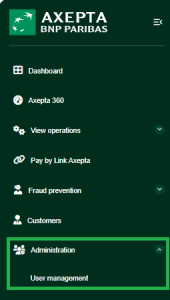
Accessing the Permissions Form
Follow the steps below to access the user permissions management form:
- Click the search button on the "User Management" form
- Select the user whose permissions you wish to modify
- Click on the user's name
- The detailed user view opens, click on 'Permissions' then 'Edit Profile'.
Deactivating/activating access rights for the user
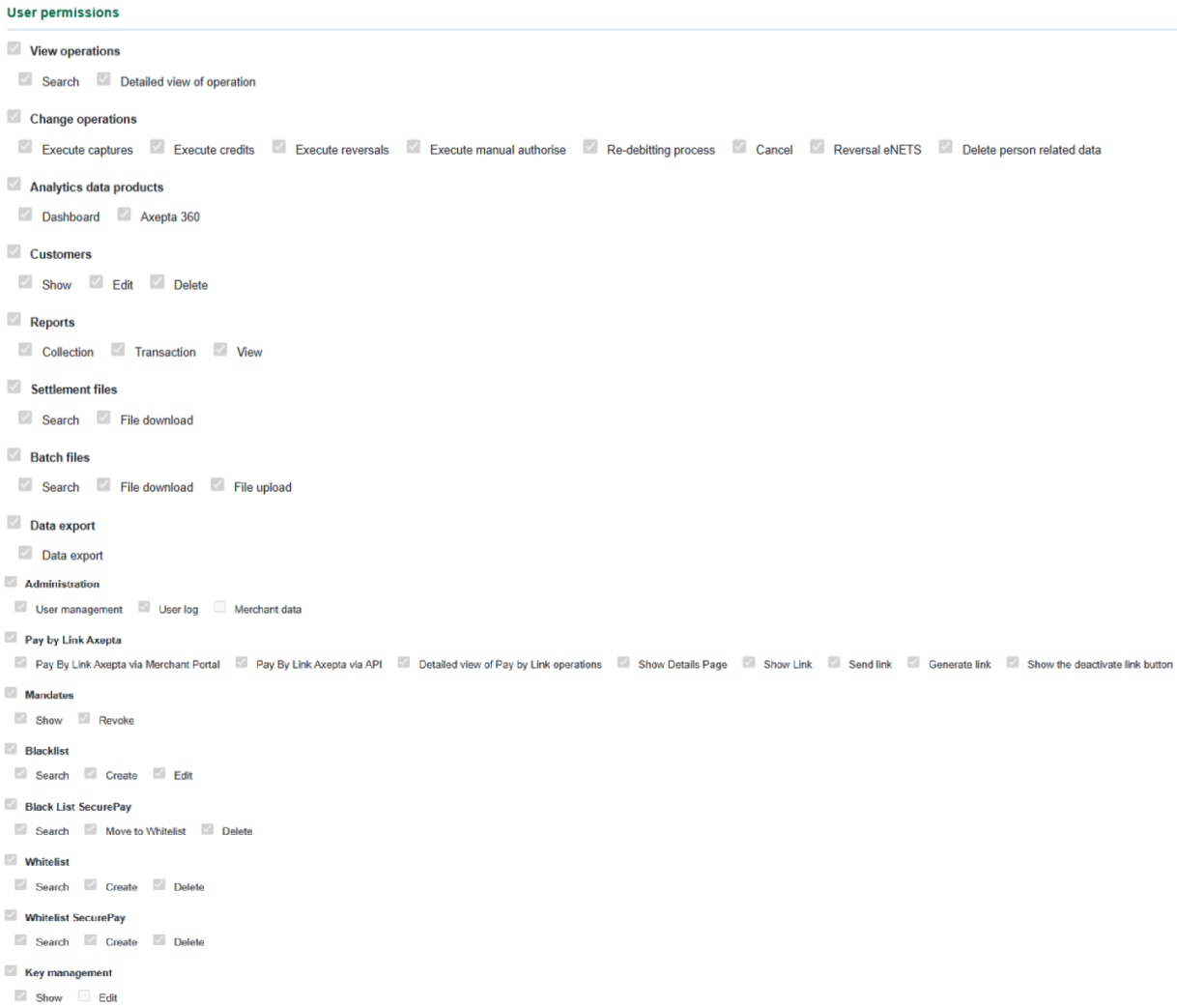
In order to enable a tab or an action for the user, you must activate the corresponding permission in the detailed view of the user.
Proceed as follows to activate or deactivate the site access rights for the user:
1. Open the detailed view of a user.
2. Click on the "permissions" tab and click on "Edit profile" button.
→ The necessary permissions can be selected. After selection click on save profile.
| Info | ||
|---|---|---|
| ||
When you activate a higher-level permission (indicated in bold type), the corresponding lower-level permissions are selected. you can individually de-select the low level user rights. Whithin "Change opérations", the following permissions are not currently included the Axepta Online offering (Execute manual authorise, Re-debiting process, Cancel, Reversal eNETS) |
Rights table
Activate or deactivate permissions. A description of the permissions can be found in the table below.
| Expand | ||||||||||
|---|---|---|---|---|---|---|---|---|---|---|
| ||||||||||
|
| Expand | ||||||||||||||||||||
|---|---|---|---|---|---|---|---|---|---|---|---|---|---|---|---|---|---|---|---|---|
| ||||||||||||||||||||
|
| Expand | ||||||
|---|---|---|---|---|---|---|
| ||||||
|
| Expand | ||||||||
|---|---|---|---|---|---|---|---|---|
| ||||||||
|
| Expand | ||||||||
|---|---|---|---|---|---|---|---|---|
| ||||||||
|
| Expand | ||||||||
|---|---|---|---|---|---|---|---|---|
| ||||||||
|
| Expand | ||||||||||
|---|---|---|---|---|---|---|---|---|---|---|
| ||||||||||
|
| Expand | ||||
|---|---|---|---|---|
| ||||
|
| Expand | ||||||||
|---|---|---|---|---|---|---|---|---|
| ||||||||
|
| Expand | ||||||||||||||||||
|---|---|---|---|---|---|---|---|---|---|---|---|---|---|---|---|---|---|---|
| ||||||||||||||||||
|
| Expand | ||||||
|---|---|---|---|---|---|---|
| ||||||
|
| Expand | ||||||||
|---|---|---|---|---|---|---|---|---|
| ||||||||
|
| Expand | ||||||||||
|---|---|---|---|---|---|---|---|---|---|---|
| ||||||||||
|
| Expand | ||||||||
|---|---|---|---|---|---|---|---|---|
| ||||||||
|
| Expand | ||||||||
|---|---|---|---|---|---|---|---|---|
| ||||||||
|
| Expand | ||||
|---|---|---|---|---|
| ||||
|
| Linchpin Teaser | ||||||||
|---|---|---|---|---|---|---|---|---|
| ||||||||