
In this section, you will find everything you need to manage the various entry points that your application will receive during and after an Axepta BNP Paribas Online payment.
You will learn:
- Which URLs to transmit when creating a payment,
- The order in which they are called,
- How to interpret the returned information,
- How to verify the actual status of a transaction,
- How to manage the webhook.
Table of Contents
1. Provide URLs : return, cancel, webhook
When initializing the payment, you must provide a URLs object:
	urls{
		"return":"https://myProcessingServer.net/myApi/success.php?transId=95330876-67ae-4949-a11c-b9a29257831b",
		"cancel":"https://myProcessingServer.net/myApi/cancel.php?transId=95330876-67ae-4949-a11c-b9a29257831b",
 		"webhook":"https://myBackOfficeServer.net/webhook.php"
	}
Return = redirection when the customer clicks the confirmation button at the end of the payment process.
Cancel = redirection if the customer cancels the payment.
Webhook = asynchronous and guaranteed notification, independent of the customer’s action.
2. Return URL & Cancel URL
One of these two URLs (return or cancel) will be called at the end of the transaction processing in order to:
- Redirect the customer back to the merchant website at the end of the transaction
- Inform the merchant of the transaction status: (successful or not)
- Return to the merchant’s back-office the unique transaction identifier payId generated by Axepta Online
When one of these URLs is called, Axepta BNP Paribas Online automatically appends the following parameter : PayId=<paymentId generated by Axepta> - see Integration recommendation
You should include your own identifier in the URLs to link the return call to your internal order.
Example of a URL triggered after customer payment validation:
- In green, the URL provided during payment initialization, including a transId to link the return to a merchant ID.
- In red, the PayId parameter added by the server.
https://myProcessingServer.net/myApi/success.php?transId=95330876-67ae-4949-a11c-b9a29257831b&PayId=b6eae9b16e3343fa90da39d4ee7bf4ad
What to Do When You Receiving This Call?
When one of these URLs is triggered:
Retrieve the PayId parameter.
Call the API to get the actual transaction status: GET /payments/getByPayId/{payId} - Retrieve payment details by Payment ID
- Update your order based on the status and responseCode.
Key fields in the API Response
- Amount: value, capturedValue, refundedValue
- Identifiers: payId, transId, xId, refNr
- Status: status = AUTHORIZED, CAPTURE_REQUEST, OK, FAILED, etc.
- Result:
- responseCode = "00000000" OR "0" indicates success
- responseDescription = textual message
A successful transaction may return either "00000000" or "0" depending on the payment stage or method.
You must check both values to determine success, "00000000" OR "0"
Examples of summarized responses
 {
	"amount":{
		"value":126,
		"currency":"EUR",
		"capturedValue":0,
		"refundedValue":0
	},
	"payId":"91a6299a704147bf934aabd79fd1dc5d",
	"merchantId":"MY_MERCHANT_ID",
	"transId":"Trans361039",
	"xId":"b55e68b7e4644a90836ae31effe1fc60",
	"refNr":"refNb77254",
	"status":"AUTHORIZED",
	"responseCode":"00000000",
	"responseDescription":"Transaction successful",
	"paymentMethods":{
		"type":"CARD"
	}
}
 {
	"amount":{
		"value":1200,
		"currency":"EUR",
		"capturedValue":0,
		"refundedValue":0
	},
	"payId":"09526745fa704e9c8584dbe893c31f99",
	"merchantId":"MY_MERCHANT_ID",
	"transId":"1230861007",
	"xId":"2781d7d379e5449e9717c901ba6f9ff7",
	"refNr":"Q1ovVxioaZ6n",
	"status":"CAPTURE_REQUEST",
	"responseCode":"0",
	"responseDescription":"REQUEST",
	"paymentMethods":{
		"type":"CARD"
	}
}
3. Webhook
At the end of transaction processing, Axepta BNP Paribas Online notifies the merchant website of the final transaction result.
The webhook notification is the only reliable way to be informed of transaction completion.
It is mandatory for the merchant system to process webhook calls.
It is sent via an HTTP REST call to the webhook URL provided during payment initialization.
It is sent even if the customer:
- Closes their browser,
- Loses connection,
- Does not return to your website.
General recommandations
Correct implementation of webhook reception is essential to ensure real-time updates of your transaction statuses and to guarantee the reliability of your ordering process.
To ensure the proper functioning of the service, we recommend applying the following technical prerequisites:
1) Connectivity and Network Security
In order for our servers to route notifications to your infrastructure, your network security rules must be configured as follows:
⚙️ Port Configuration Notifications are transmitted via the HTTPS protocol.
- Required Port: Port 443 must be open and accessible for inbound traffic on your server.
- Important: The use of non-standard ports (e.g., 8097, 8443) is not supported by the platform and will result in notification delivery failure. If your application listens on a specific port, we recommend implementing a reverse proxy or a routing rule to redirect traffic from port 443 to your application.
🌐 IP Whitelisting To secure your exchanges while allowing the reception of flows, you must authorize (whitelist) the IP address ranges of our technical provider, Computop. Please configure your firewalls (Firewalls / NSG) to accept incoming requests from the following IPs:
- 213.155.65.64/26
- 213.95.169.128/27
- 217.92.237.167
2) Technical Requirements for the Endpoint (Reception URL)
🔒 Protocol and Certificates
- HTTPS Mandatory: The notification URL must be secured via HTTPS.
- TLS Version: The destination server must support TLS 1.2 or higher.
- Certificates: We recommend using an SSL certificate issued by a recognized Certificate Authority (CA).
🚀 Performance and Availability
- Response Time: Your endpoint must respond quickly to avoid timeouts.
- Response Code: To confirm the successful reception of the notification, your server must return an HTTP 200 OK code. Any other code (e.g., 4xx or 5xx) will be considered a delivery failure and may trigger retry attempts.
3) Implementation Recommendations (Best Practices)
To make your integration more resilient, we recommend adopting the following mechanisms:
🛡️ Fallback Mechanism While webhooks are the preferred method for transaction notifications, intermittent network incidents may occur.
Recommendation: Implement an active polling mechanism using the Get Payment Details by TransID operation. If a webhook is not received within a defined timeframe, your system should be able to query the API to retrieve the actual status of the transaction.
🔍 Signature Validation To guarantee the authenticity of notifications and ensure they originate from Axepta BNP Paribas, we recommend implementing the verification of the signature headers (HMAC) provided in each request.
When is it sent?
After each asynchronous payment processing completion
If the endpoint is unavailable, the notification is retried up to 8 times
Attempt | Delay | Time after 1st notification |
|---|---|---|
0 | Instantaneous | 0 |
1 | 00:01 h | 00:01 h |
2 | 00:08 h | 00:09 h |
3 | 00:27 h | 00:36 h |
4 | 01:04 h | 01:40 h |
5 | 02:05 h | 03:45 h |
6 | 03:36 h | 07:21 h |
7 | 05:43 h | 13:04 h |
8 | 08:32 h | 21:36 h |
What you must do
- Read the JSON payload
- Identify the transaction using payId or transId
- Update your system accordingly
- Respond with HTTP 200 OK
Important: Never finalize an order based solely on the Return URL.
Always rely on the webhook as the source of truth.
Webhook Structure
Provided Fields
- merchantId
- payId
- transId
- xId
- refNr
- status (AUTHORIZED, FAILED, etc.)
- responseCode / responseDescription
- amount
- paymentMethods
- creationDate (UTC)
- channel (ECOM, MOTO, Pay By Link…)
Example
{
    "merchantId": "YOUR_MERCHANT_ID",
    "payId": "91a6299a704147bf934aabd79fd1dc5d",
    "transId": "Trans361039",
    "xid": "b55e68b7e4644a90836ae31effe1fc60",
    "refNr": "refNb77254",
    "status": "AUTHORIZED",
    "responseCode": "00000000",
    "responseDescription": "Transaction successful",
    "amount": {
        "value": 126,
        "currency": "EUR"
    },
    "paymentMethods": {
        "type": "CARD"
    },
    "creationDate": "2025-10-30T11:27:57Z",
    "channel": "ECOM"
}
Security and Verification
To ensure the authenticity of webhook data, payloads are signed using HMAC-SHA256.
The signature is included in three HTTP headers within the webhook message.
Signature headers
| X-Paygate-Signature-Version | Version of the signature format (currently, fixed value: v1) |
| X-Paygate-Timestamp | Unix epoch timestamp (seconds since 1970-01-01T00:00:00Z, UTC) |
| X-Paygate-Signature | Signature in the format |
Multiple Keys
It is possible to configure up to two sets of keys for API Authentication and Signature generation.
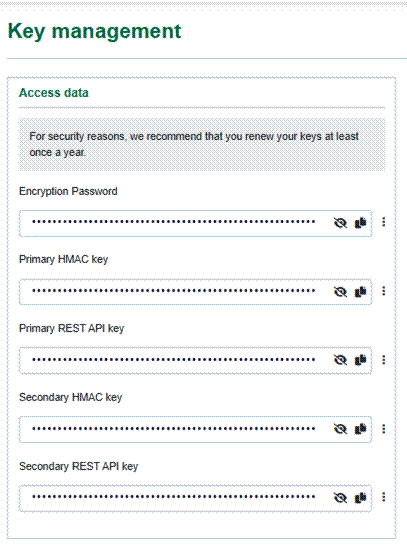
The keys are defined in the merchant portal and are labeled:
- Primary (v1)
- Secondary (v2)
The key version used by the Axepta Platform for webhook signatures (v1 or v2) depends on the key used by the merchant during the authentication process.
For example, if the merchant authenticates using the Secondary (v2) REST API Key, the Secondary (v2) REST HMAC Key will be used for signature generation, and the X-Paygate-Signature header will start with: "v2=...".
The Key version used by Axepta Platform for webhook signature (v1 or v2) is choosed accordingly to key used by the Merchant during the authentication process (v1 or v2)
Key rotation
Two sets of keys can be configured, but only one set is active at a time (the one selected during the authentication process).
This allows you to update the inactive set, configure and distribute keys across all equipment, and then switch to the new version when ready.
Signature Generation (Axepta BNP-Paribas Online)
signed_payload = timestamp + "." + raw_json_body
signature = HMAC_SHA256(secret, signed_payload)
secret– HMAC key- The generated
Signatureis encoded 'hex' and the header is set as follows:
X-Paygate-Signature: v1=<hex-hmac>Signature Verification (Merchant)
To verify the authenticity of the webhook message data:
Extract the data carried by the HTTP headers:
X-Paygate-TimestampX-Paygate-Signature
Retrieve the raw JSON payload (exact binary body)
Compute the HMAC using the extracted data
- signed_payload = timestamp + "." + raw_body expected_signature = HMAC_SHA256(secret, signed_payload)
- Compare the calculated signature with the received signature using a "constant-time" method.
- Validate the webhook if:
- The signatures are identical
- The Timestamp is within ±5 minutes of your local clock.
Webhook authenticity verification example:
Merchant Id used : BNP_DEMO_MID
Merchant Id HMAC Key : see Sandbox & Test page
Transaction done the 19th of May, 2026, at 09h23m20sec Paris time (GMT+2)
Webhook Validation:
| Check | Parameter used | Value | Result |
|---|---|---|---|
| Is the signature version equal to v1 | X-Paygate-Signature-Version | v1 | CORRECT |
Is the Timestamp is within ±5 minutes of your local clock ? | X-Paygate-Timestamp | 1779175402 | CORRECT Unix epoch time: 1779175402 Converted to GMT = 07h23m22sec It's between 5 min of transaction date&time (2 sec exactly) |
| Are the signatures identical ? | X-Paygate-Signature | DF1F4AA6022460A9821832F9B89DF82D92D01B35C80DDDF596E97FF26E0ABB14 | CORRECT (see below) |
Signature verification:
Data used for signature: <epoch timestamp value>.<full webhook json body>
Value:
1779175402.{"merchantId": "BNP_DEMO_MID","payId": "413cef3ff4fd4b08af2245d5a889dbaa","transId": "Trans293156","xid": "7919a1e81571466ca8f5737d5414f7a4","refNr": "refNb81210","status": "FAILED","responseCode": "22940040","responseDescription": "NO RESPONSE","amount": {"value": 460,"currency": "EUR"},"paymentMethods": {"type": "CARD"},"creationDate": "2026-05-19T07:23:20Z","channel": "ECOM"}
Computed HMAC-SHA256 with previous value as input, using 6Gp_A!8f)3zZ9K]gb7S?2*tN(yH54[wB key:
df1f4aa6022460a9821832f9b89df82d92d01b35c80dddf596e97ff26e0abb14
Nota: signature verification should be done without case sensitivity
Integration Best Pratices
- Always verify the transaction via the
getByPayIdendpoint, even if the front-end return indicates success, - Always process the webhook notifications.
- Always verify webhook data authenticity by validating the signature.
- Log all return/cancel/webhook calls.