
Axepta Online offers daily reconciliation reporting (Settlement File).
The Settlement File provide different payment methods data by the merchant in order to set up reconciliation and reporting.
Clearing and settlement information is retrieved from individual payment service providers and acquirers.
The file is in ''Comma Separated Values'' (CSV) format.
This documentation explains the steps to recover the Settlement File.
| Tip |
|---|
This file recovery method requires the generation of SSH and PGP key pairs that will be used to:
|
Implementation steps
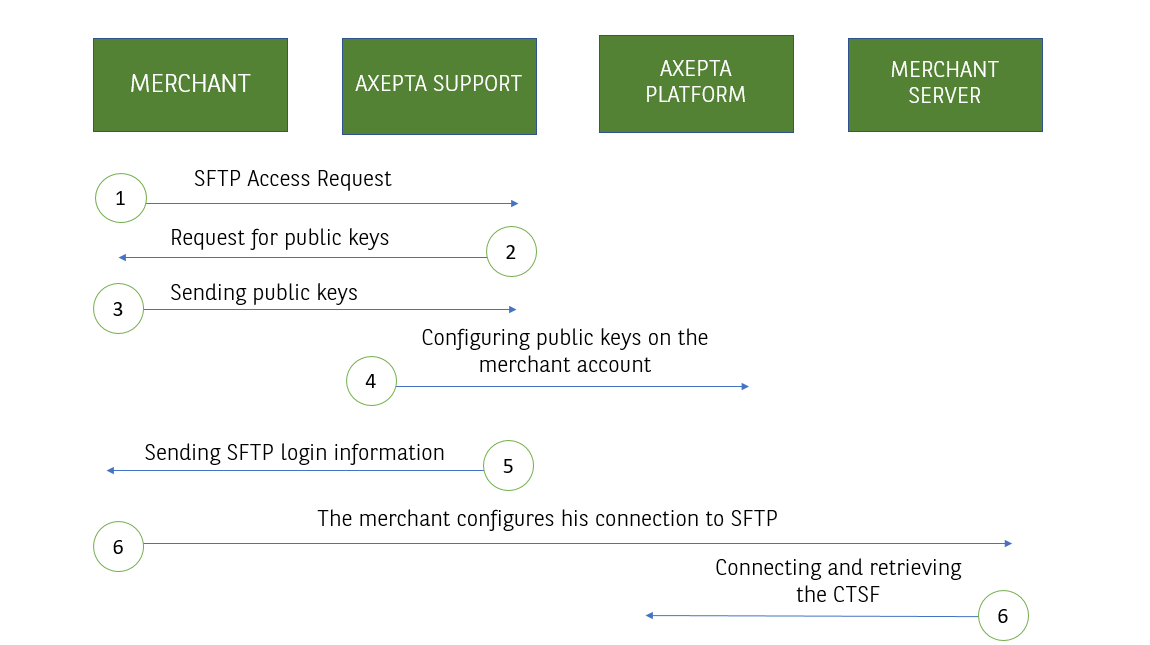
- The Merchant contacts Axepta BNP Paribas Support to request the reconciliation file availability via sFTP.
- Axepta Support contacts the Merchant and asks it to send his SSH and PGP public keys.
- The Merchant creates his SSH and PGP key pairs. The merchant only submits his public keys to Axepta BNP Paribas Support.
- Axepta Support set up the appropriate configuration.
- Axepta Support sent the Merchant Axepta sFTP connection data by mail.
- The Merchant establishes the connection between his information system and the Axepta sFTP, recovers the encrypted file and decrypts it.
Step details
Step 1: Sending the request to Axepta support.
The merchant send the sftp request by e-mail to Axepta support.
| Info |
|---|
| More details regarding Support : Axepta BNP Paribas Helpdesk |
Step 2: Sending SSH and PGP public keys
In response, Axepta Support contacts the merchant by email so that he can send back SSH and PGP public keys.
This email also contains the Axepta Online public key which will be used only in case the merchant used batch export.
| Info | ||
|---|---|---|
| ||
Please note the following information in order to set up reconciliation files via sFTP:
It is necessary to assign an email address to your public PGP key as it will act as an identifier. We recommend that you do not use a private email address but an email address from the company's domain.
|
Step 3: Generate SSH and PGP key pairs and sent to support
Step 3.1: Generate Key Pairs
The Merchant (its integrator or IT department) generates SSH and PGP key pairs.
SSH and PGP systems use so-called asymmetric encryption modes characterized by the key pair uses.
This pair is composed of:
- An encryption key called a public key
- A decryption key called a private key
| Info | ||
|---|---|---|
| ||
|
| Warning | ||
|---|---|---|
| ||
|
Step 3.2: Send to Support
The merchant sends his SSH and PGP public keys to Axepta Support, specifying his MID.
| Info |
|---|
| To know more details regarding support Axepta : Axepta BNP Paribas Helpdesk |
Step 4 and 5: Configuration by Axepta Support
Axepta Support configures the SSH and PGP public keys provided by the merchant on the Axepta platform.
Once this operation is complete, a confirmation email with the login credentials to the Axepta server is sent to the merchant.
| Info | ||
|---|---|---|
| ||
The SSH public key has been configured
|
Step 6: Connect to sFTP and retrieve the reconciliation file
The Merchant, the implementation manager or the IT department, sets up the connection between the information system and the Axepta server.
Once the connection is established, the reconciliation file can be retrieved daily from 3pm.
The file can be decrypted (thanks to the PGP private key) and integrated into the Merchant's tools.
| Tip |
|---|
The files will be automatically deleted from the Axepta sFTP server after 14 days. The reconciliation file is generated only when transactions are processed. |