

Sommaire
| Table of Contents |
|---|
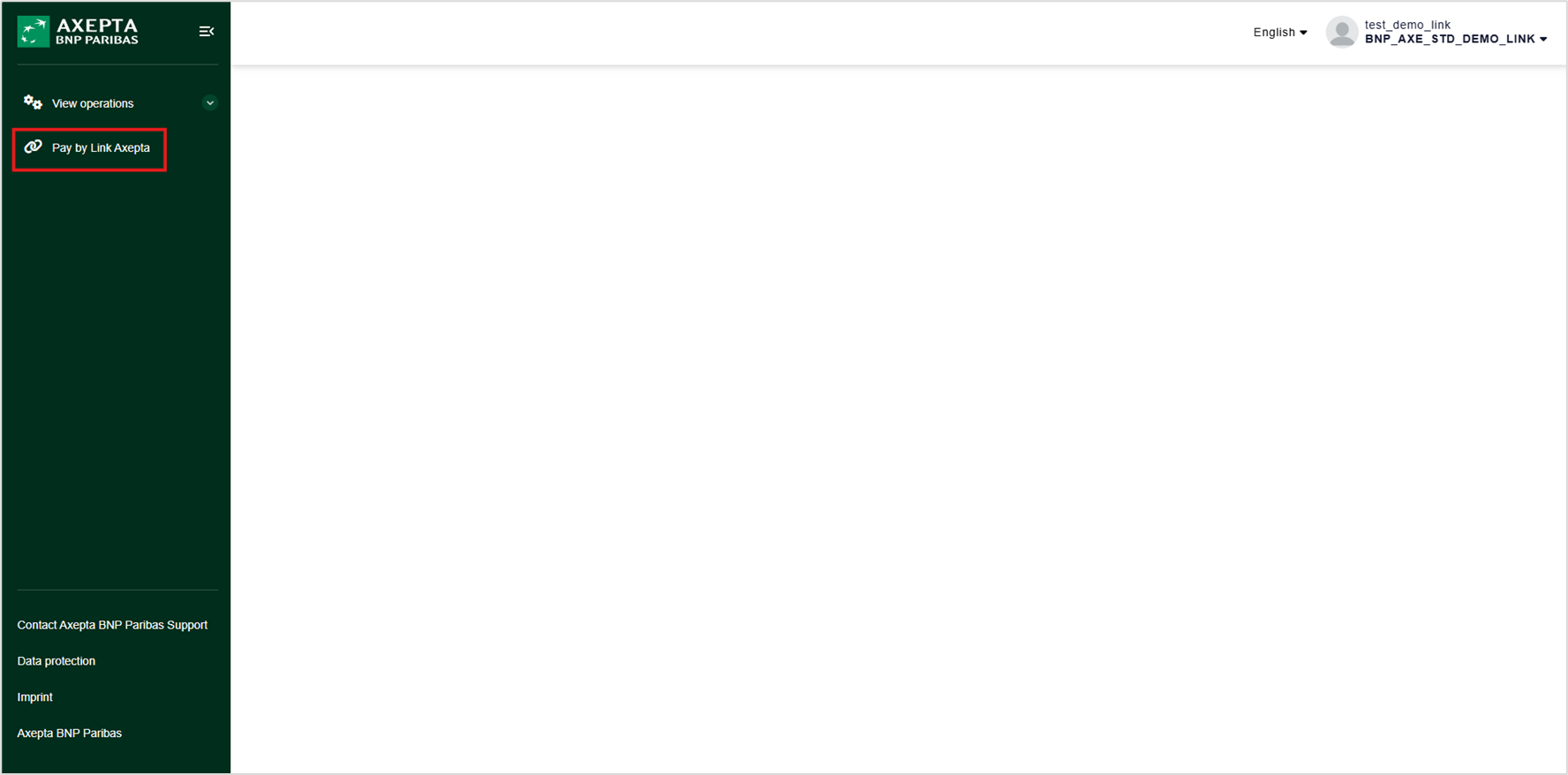
Toegang tot de dienst
Om een betaallink aan te maken, moet u beschikken over de nodige rechten om toegang te krijgen tot het menu "
Access to service
To create a payment link, make sure you have the necessary permissions to access the **Pay by Link Axepta** menu in your merchant portal" in uw handelsportaal.
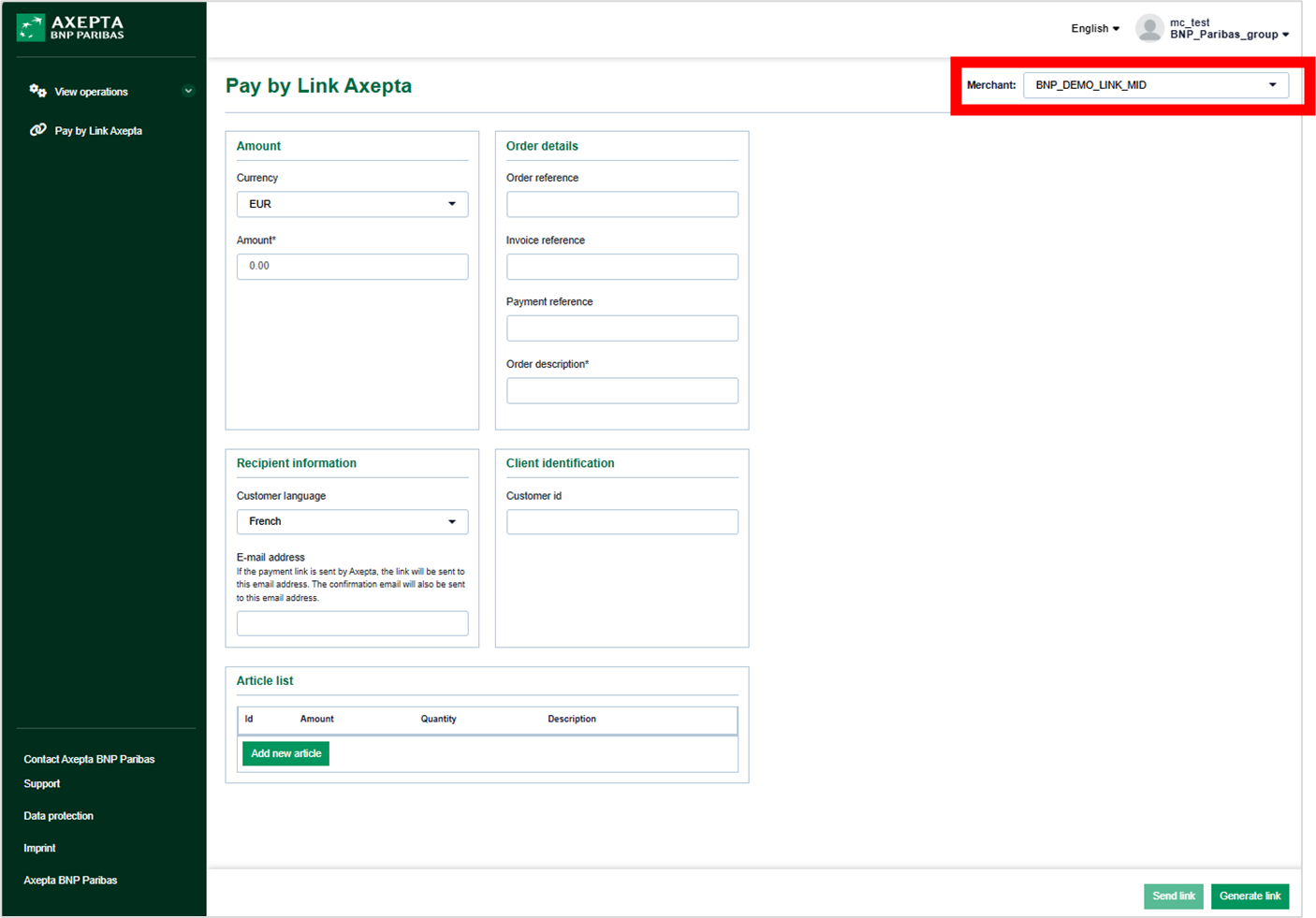
Payment Link Creation Form
Formulier voor het aanmaken van een betaallink
| Warning |
|---|
Belangrijk: Selecteer verplicht het |
| Warning |
Warning, it is essential to select the MID "_LINK" as this is the MID on which the payment link is configured. |
Section description
Amount
- Currency (Mandatory): Select the currency for the transaction.
- Amount (Mandatory): Enter the amount to be paid.
Order details
- Order Number (Optional): Enter the order number associated with the transaction.
- Invoice Number (Optional): Enter the invoice number if applicable.
- Payment reference (Optional): Customize your reference for simplified tracking. Otherwise, a reference will be automatically generated. Choose a unique, alphanumeric reference limited to 12 characters.
- Order description (Mandatory): Enter the description of your order to ensure the execution of your transactions with certain payment methods.
Client Identification
- Customer Number (Optional): Enter the customer number for precise identification.
Recipient Information
- Customer Language (Mandatory): Choose the customer's language (French or English) to customize the payment process.
- Email Address (Optional): Enter the customer's email address to send the payment link. This address will also be used to send the payment confirmation.
Article list
- ID (Optional): Item identifier.
- Amount (Optional): Item amount. The decimals separator to be used is the dot (.)
- Quantity (Optional): Item quantity.
- Description (Optional): Detailed description of the item.
- Add Item Button (Optional): Add multiple items to precisely describe the order content.
Action Buttons
- Send Link (Optional): This button, visible to authorized users, allows sending the payment link via email. It activates as soon as the customer's email address is entered. The email is managed by Axepta.
- Generate Link (Optional): This button allows you to copy and paste the payment link to send it directly to your customers via your preferred channel.
Example of email with the payment link sent by Axepta BNP Paribas
, aangezien dit het MID is waarop de betaallink is geconfigureerd. |
Beschrijving van de secties
Bedrag
- Valuta (verplicht): Selecteer de valuta voor de transactie.
- Bedrag (verplicht): Voer het te betalen bedrag in.
Bestelgegevens
- Bestelnummer (optioneel): Voer het bestelnummer in dat gekoppeld is aan de transactie.
- Factuurnummer (optioneel): Voer het factuurnummer in, indien van toepassing.
- Betalingsreferentie (optioneel):
- Pas uw referentie aan voor vereenvoudigde opvolging.
- Indien niet ingevuld, wordt automatisch een referentie gegenereerd.
- Kies een unieke, alfanumerieke referentie (maximaal 12 tekens).
- Bestelbeschrijving (verplicht): Voer de beschrijving van uw bestelling in om de uitvoering van uw transacties met bepaalde betaalmethoden te garanderen.
Klantenidentificatie
- Klantennummer (optioneel): Voer het klantennummer in voor een precieze identificatie.
Gegevens van de ontvanger
- Taal van de klant (verplicht): Kies de taal van de klant (Frans of Engels) om het betaalproces aan te passen.
- E-mailadres (optioneel):
- Voer het e-mailadres van de klant in om de betaallink te verzenden.
- Dit adres wordt ook gebruikt om de betalingsbevestiging te versturen.
Lijst van artikelen
- ID (optioneel): Artikelidentificatie.
- Bedrag (optioneel): Artikelbedrag. Gebruik een punt (.) als decimale scheidingsteken.
- Hoeveelheid (optioneel): Aantal artikelen.
- Beschrijving (optioneel): Gedetailleerde beschrijving van het artikel.
- Knop "Artikel toevoegen" (optioneel): Voeg meerdere artikelen toe om de inhoud van de bestelling precies te beschrijven.
Voorbeeld van een e-mail met de betaallink verzonden door Axepta BNP Paribas
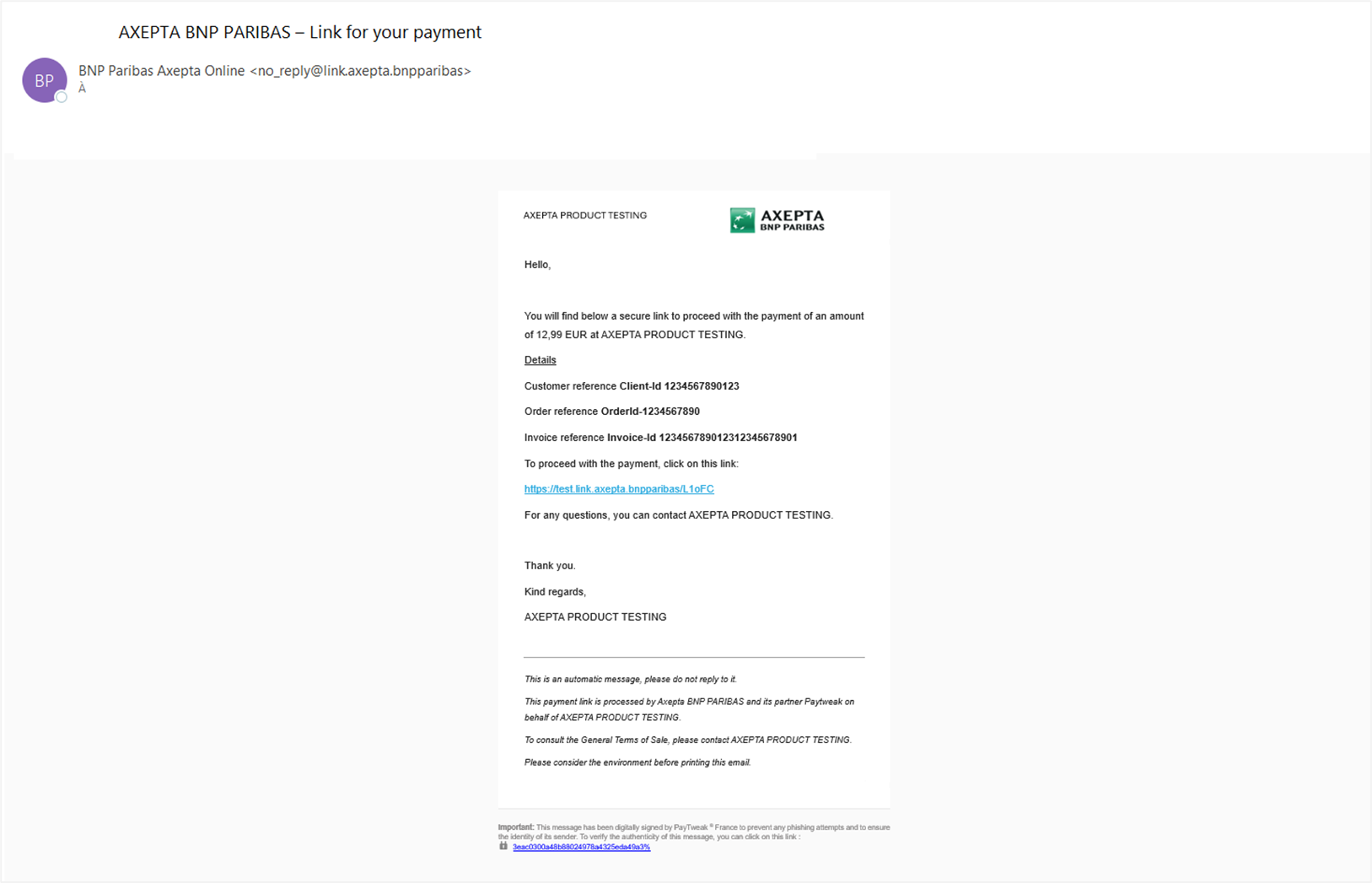
Inhoud van de e-mail ontvangen door de klant
- Naam afzender: BNP Paribas Axepta Online
- E-mailadres afzender
Email Content Received by the Client
Sender's Name: BNP Paribas Axepta Online
Sender's Email Address- : no_reply@link.axepta.bnpparibas
Recipient's Email Address: Derived from the input form
Email Subject- E-mailadres ontvanger: Afgeleid van het invoerformulier
- Onderwerp van de e-mail: AXEPTA BNP PARIBAS - Link for your Payment
Merchant Name
Amount
Customer Reference (If filled in the payment link creation form)
Order Reference (If filled in the payment link creation form)
Invoice Reference (If filled in the payment link creation form)
Clickable Payment Link- voor uw betaling
Email Content:
Inhoud van de e-mail:
- Naam van de handelaar
- Bedrag
- Klantenreferentie (indien ingevuld in het formulier voor het aanmaken van de betaallink)
- Bestelreferentie (indien ingevuld in het formulier voor het aanmaken van de betaallink)
- Factuurreferentie (indien ingevuld in het formulier voor het aanmaken van de betaallink)
- Klikbare betaallink