This section details the features related to the Deze sectie beschrijft de functionaliteiten met betrekking tot de Axepta BNP Paribas Online payment pagebetaalpagina: page type, integration methods, customization options.This section containspaginatype, integratiemethoden en aanpassingsmogelijkheden.
In deze sectie vindt u:
| Table of Contents |
|---|
Axepta BNP Paribas Online
payment pagesbetaalpagina’s
The De Axepta BNP Paribas Online solution offers 2 payment pages:-oplossing biedt 2 betaalpagina’s aan:
Axepta BNP Paribas betaalpagina’s | ||||||
|---|---|---|---|---|---|---|
Betaalpagina’s | Betaalpagina gehost door | Pages de paiement BNP Paribas payment page: | Payment pages | Payment Page Hosted by Axepta BNP Paribas (Hosted Payment Page) Display of all payment means that the merchant wishes to offer. Weergave van alle betaalmiddelen die de handelaar wenst aan te bieden. | Kaartbetaalformulier Card Payment Form (Payssl)Card payment only display Uitsluitend weergave voor kaartbetalingen | |
Endpoint | /payments/sessions | /payments (card) | ||||
Customization |
| |||||
Payment experience selection
The merchant can choose between the 2 following payment experiences:
Option
Redirection
iFrame
Overview
Functioning
Assets
- Easiest integration
- Little development on the merchant's side
- The buyer stays on the merchant's site: known and trusted environment
- The payment tunnel is smooth
|
Keuze betaalervaring
De handelaar kan kiezen tussen 2 betaalervaringen:
Optie | Hosted Payment Page (omgeleid) | Ingebed in handelaarsite (iframe) |
|---|---|---|
Overzicht |
|
|
| Werking | Koper wordt doorgestuurd naar de Axepta BNP Paribas Online betaalpagina. | Koper blijft op de site van de handelaar; de betaalpagina wordt ingebed weergegeven. |
| Voordelen | - Eenvoudigste integratie - Minimale ontwikkeling aan handelaarszijde | - Koper blijft in een bekende en vertrouwde omgeving - Vloeiende betalingsstroom |
Dynamische instellingen betaalpagina
Talen betaalpagina
De betaalpagina is beschikbaar in:
- Frans (
fr) - Engels (
en) - Nederlands (
nl)
Logica taalselectie:
- Bij het eerste bezoek:
- Als de taal niet is gespecificeerd in de API-aanroep, wordt de browsertaal gebruikt.
- Als de browsertaal niet beschikbaar is, wordt Engels als standaard weergegeven.
- De koper kan de taal handmatig wijzigen via een keuzemenu (rechtsboven).
- De gekozen taal wordt opgeslagen voor volgende bezoeken
Dynamic payment page settings
Payment page languages
The payment page is available in French, English and Dutch.
On the first visit, if the language is not specified in the API call, then the payment page language corresponds to the browser language.
If the browser language is not available on the payment page, then the payment page is displayed in English.
The user has the option to change the language, once on the payment page thanks to a drop-down menu, at the top right of it. If he does so, this language will be displayed by default during the next visit- .
API call
| Code Block | ||
|---|---|---|
| ||
"language": "en" |
Available languagesBeschikbare talen
| LanguageTaal | Value Parameterwaarde in the API |
|---|---|
| FrenchFrans | fr |
| EnglishEngels | en |
| DutchNederlands | nl |
Weergave betaalmethoden op de Hosted Payment Page
)Standaard worden alle beschikbare betaalmethoden voor de MerchantID getoond. De handelaar kan de weergegeven betaalmethoden beperken via de parameter: 'allowedPaymentMethods'
By default, all available payment methods on the MerchantID are displayed on the payment method selection page.
The merchant has the possibility to restrict and control the payment means displayed to a customer via the 'allowedPaymentMethods' parameter.
| Code Block | ||
|---|---|---|
| ||
 "allowedPaymentMethods" :  [
      "PAYPAL",
      "CARD"
], |
Beschikbare betaalmethoden:
| Betaalmethode |
|---|
Available payment methods
Payment Method | Parameter Value for "allowedPaymentMethods" in API Call to Parameterwaarde in API ( | /payments/sessions) |
|---|---|---|
Card *See below the list of card brands | CARD | |
BANCONTACT | BANCONTACT | |
| PAYPAL | PAYPAL | |
APPLEPAY* | APPLEPAY* | |
| GOOGLEPAY* | GOOGLEPAY* | |
WERO* | WERO* |
*in development, will be available soon
Display of payment methods on the card payment form (Payssl)
In ontwikkeling, binnenkort beschikbaar.
Weergave betaalmethoden op het kaartbetaalformulier (Payssl)
Standaard worden alle beschikbare kaartmerken voor de MerchantID getoond. De handelaar kan de getoonde kaartmerken beperken via de
By default, all available payment methods on the MerchantID are displayed on the payment method selection page.
The merchant has the possibility to restrict and control the card(s) displayed to a customer via the parameter 'paymentMethods.card.subType'.
| Code Block | ||||
|---|---|---|---|---|
| ||||
"paymentMethods": {
        "card" : {
			...
            "subType" : ["VISA","MASTERCARD"],
			...
}, |
Beschikbare kaarten:
| Kaart | API-waarde |
Available cards
| Card | Value in the API |
Visa | VISA |
MasterCard | MASTERCARD |
Customizable fields on payment pages
Aanpasbare velden (CustomFields) op betaalpagina’s
Lijst van CustomFields
Wanneer de handelaar de standaardpagina van Axepta BNP Paribas gebruikt, kan hij:
- Een eigen logo toevoegen.
- Dynamische velden (CustomFields) aanpassen (bv. orderdetails, koperinformatie
List of customFields
When the merchant decides to use BNP Paribas' standard page, he can insert its own logo and customizes specific fields called dynamic or customizable fields (customFields- ).
Parameter | Format | CND | Description |
|---|---|---|---|
template.customFields.customField1 | ans...50 | O | Amount and Currency |
template.customFields.customField2 | ans...50 | O | Order Reference |
template.customFields.customField3 | ans...256 | O | Merchant Logo Merchant Logo URL (recommended size: 200x100 pixels) |
template.customFields.customField4 | ans...50 | O | Invoice Reference |
template.customFields.customField5 | ans...50 | O | User Information |
template.customFields.customField6 | ans...50 | O | Delivery Address |
template.customFields.customField7 | ans...50 | O | Billing Address |
template.customFields.customField8 | ans...50 | O | Customizable Field Name (header) (merchant-defined) |
template.customFields.customField9 | ans...255 | O | Custom Field Value (related to field 8) |
template.customFields.customField14 | ans...50 | O | This option enables the iframe implementation in the merchant's payment page Accepted value: "iframe" |
| Info |
|---|
The customFields allow displaying text with line breaks. In this case, you need to add the character "|" in the customField content to indicate a line break. Example: CustomField6 = Line 1|Line 2|Line 3 The customFields that accept the "|" character are CustomField4, CustomField5, CustomField6, CustomField7, and CustomField9
|
| Code Block | ||||||
|---|---|---|---|---|---|---|
| ||||||
...
	"template": {
        "customFields": {
            "customField1": "0.71 €",
			"customField2": "invoice7882181823303",
			"customField4": "order292322497021792",
            "customField5": "+33600000000|john.doe@bnpparibas.com",
			"customField6": "41 Rue de Valmy|93100 Montreuil",
            "customField7": "41 Rue de Valmy|93100 Montreuil",
        }
	},
... |
Voorbeelden van CustomFields in Hosted Payment Page (/payments/sessions):
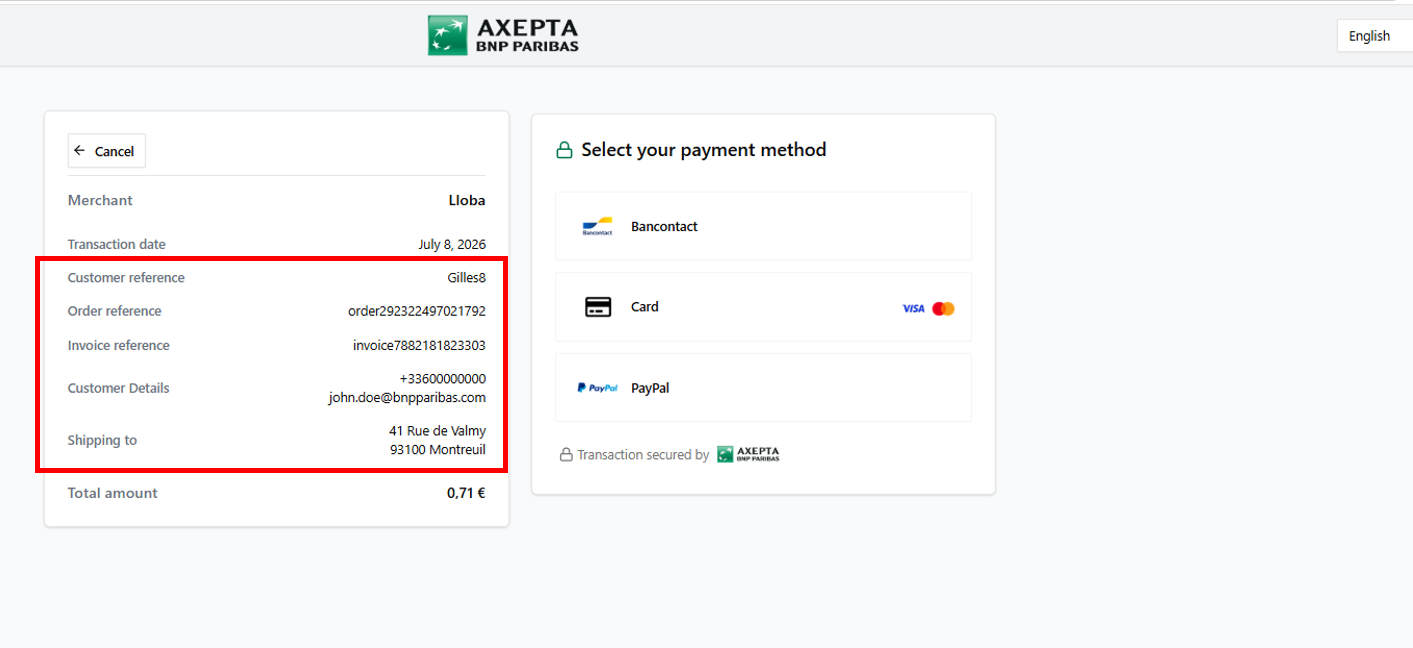
Example of Hosted Payment Page with customFields
| Code Block | ||||||
|---|---|---|---|---|---|---|
| ||||||
...
"paymentMethods": {
        "type": "CARD",
        "card": {
            "template": {
        		 "customFields": {
                   "customField1": "0.71 €",
					"customField2": "invoice7882181823303",
					"customField4": "order292322497021792",
            		"customField5": "+33600000000|john.doe@bnpparibas.com",
					"customField6": "41 Rue de Valmy|93100 Montreuil",
            }
       }
    }
}
... |
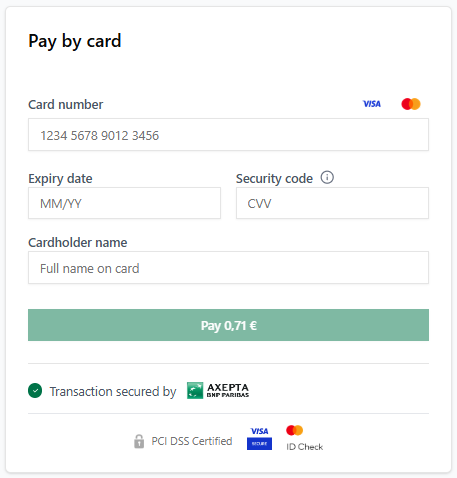
Example of Card Payment form with customFields
Voorbeelden van CustomFields in Kaartbetaalformulier (/payments):
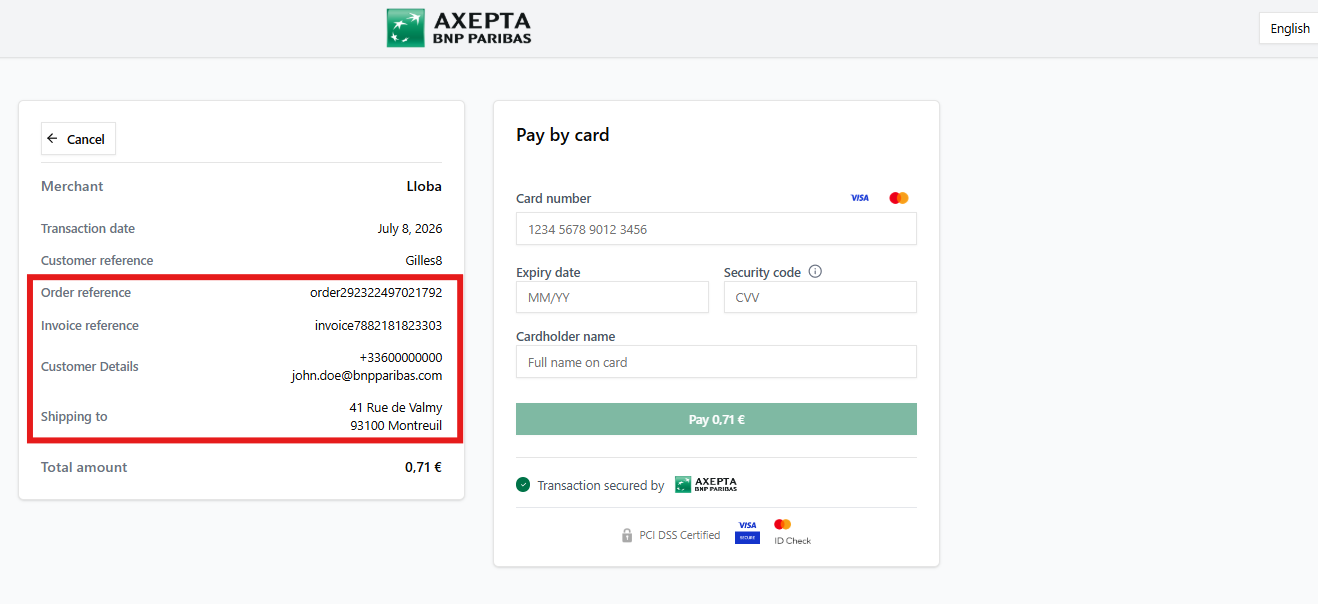
Implementatie van
Implementation of theiframe (customField14)
Hosted Payment Page
) on the merchant site (iframe)in iframe (op handelaarsite)
Wanneer When the parameter customField14 = "iframe" is set on the Hosted Payment Page, all other custom fields become invisible is ingesteld, verdwijnen alle andere CustomFields (behalve customField1).
| Code Block | ||||||
|---|---|---|---|---|---|---|
| ||||||
...	"template": {
        "customFields": {
					"customField1": "0.71 €",
					"customField2": "invoice7882181823303",
					"customField4": "order292322497021792",
            		"customField5": "+33600000000|john.doe@bnpparibas.com",
					"customField6": "41 Rue de Valmy|93100 Montreuil",
            		"customField14": "iframe"
        }
	},
... |
Example of Voorbeeld van een Hosted Payment Page with the met customField14
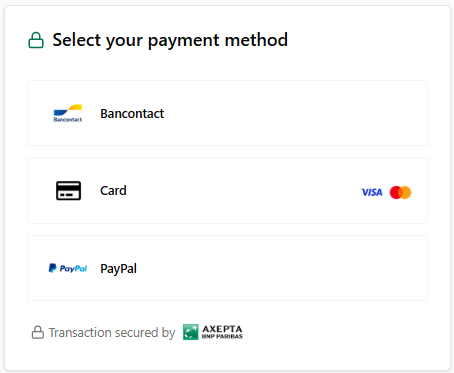
Weergave van het kaartbetaalformulier
Display of the card payment form(Payssl)
on the merchant siteop de webshop van de handelaar (iframe)
When the Wanneer de parameter customField14 = "iframe" is set on the Hosted Payment Page, all other custom fields become invisible, except for customField1ingesteld, worden alle andere custom fields verborgen, behalve customField1.
| Code Block | ||||||
|---|---|---|---|---|---|---|
| ||||||
...
"paymentMethods": {
        "integrationType": "HOSTED",
        "type": "CARD",
        "card": {
            "template": {
        		 "customFields": {
           		 	"customField1": "0.71 €",
					"customField2": "invoice7882181823303",
					"customField4": "order292322497021792",
            		"customField5": "+33600000000|john.doe@bnpparibas.com",
					"customField6": "41 Rue de Valmy|93100 Montreuil",
                    "customField14": "iframe"
            }
       }
    }
... |
Example of Card Payment form with the Voorbeeld: Kaartbetaalformulier (Payssl) met customField14