Versions Compared

Key

  • This line was added.
  • This line was removed.
  • Formatting was changed.

Cas d'usage: Client disposant d'un compte PayPal V1 existant

1. Validation du compte PayPal

Pour commencer, nous vous invitons à vérifier l'état de votre compte PayPal :

  • Votre compte est-il toujours actif ?
  • Votre adresse e-mail associée au compte PayPal est-elle toujours valide ?

Ces deux éléments doivent être validés au préalable avant d'entamer le processus de

Use case : Client with an existing PayPal V1 account 

1.Validate Paypal Account

In the First place, we invite you to validate the status of your PayPal account - is the account still ‘active’ and is the Email-address of the PayPal Account still valid?

Both should be confirmed prior to the migration.


2. Récupération du PayerID

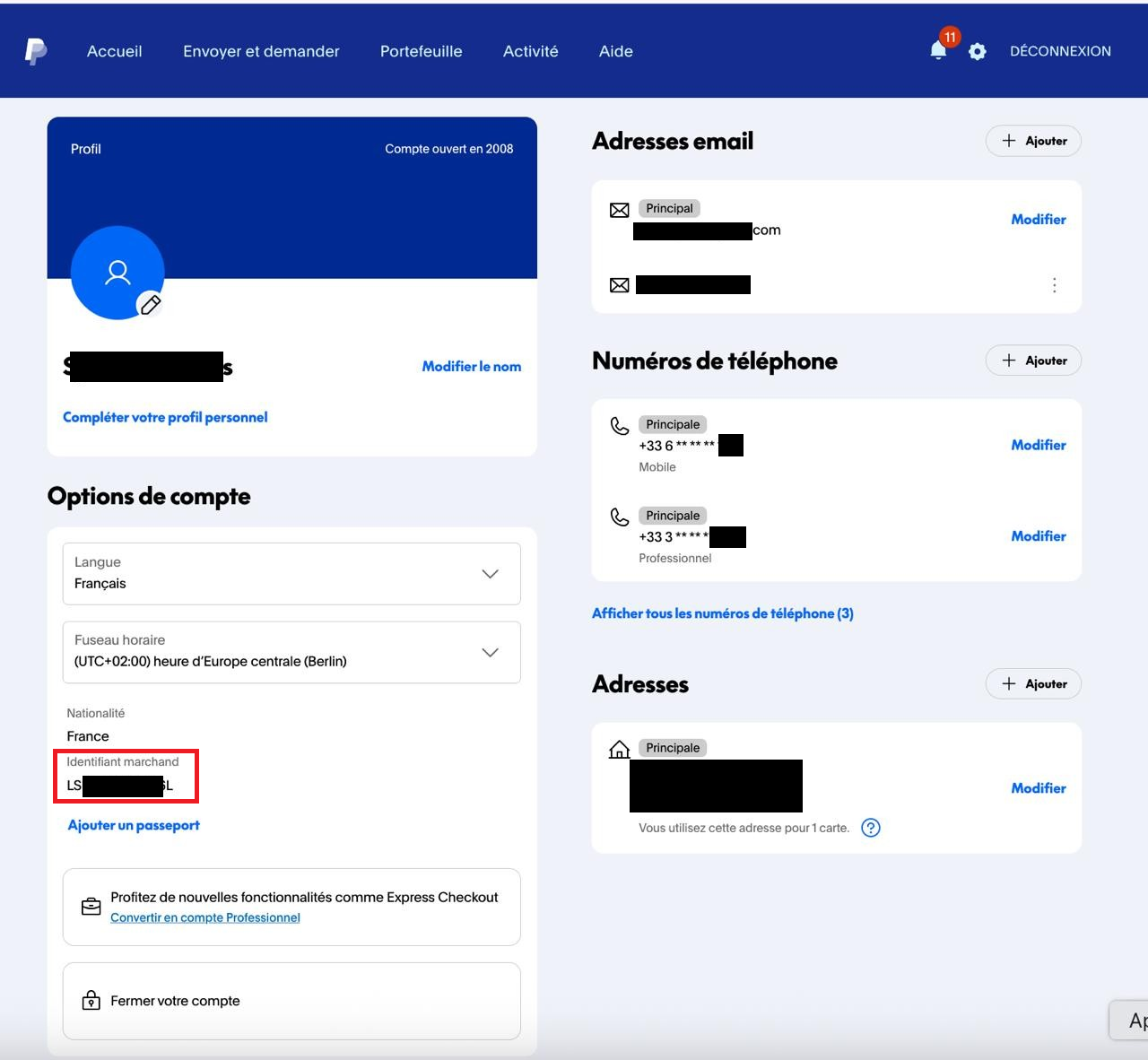
Retrieve your PayerID from your PayPal Account, this is to be provided to BNP Axepta for configuration and activation of Récupérez votre PayerID depuis votre compte PayPal, puis transmettez-le à BNP Axepta pour la configuration et l'activation de PayPal V2.

PayerID can be found under your PayPal account by Où trouver le PayerID ? Connectez-vous à votre compte PayPal via https://paypal.com/myaccount/settings/ , as follows. PayerID uniquely identifies merchant in PayPal. The identifier is the same for Sandbox and Production environments Le PayerID, disponible dans cette section, permet d'identifier de manière unique le marchand dans PayPal. Cet identifiant est le même pour les environnements Sandbox et Production.


3. Autorisations API

Permissions

In preparation of the Migration, please grant API Permissions. This will not affect processing of PayPal Classic payments!

Dans le cadre de la migration, veuillez accorder les autorisations API requises. Cette opération n'aura aucun impact sur le traitement des paiements via PayPal Classic.


Tip

Pour accorder les autorisations en environnement Production, cliquez sur le lien Production ci-dessous, connectez-vous à PayPal avec vos identifiants, puis cliquez sur "Accepter"

Tip

To grand permissions for Production click the Production link below, login to PayPal using your Paypal login/password and click “Agree”.


Multiexcerpt
MultiExcerptNamePayPalCode-GrantingPermissions
shouldDisplayInlineCommentsInIncludesfalse


HTML
<br/>
<script type="text/javascript">
    function sh() {
        alert('Failed to acquire paypal registration link, please contact customer support or try again later.')
    }
  
    function getPPRegUrl(merchId,dataKey,dataLen) {
        const request = new XMLHttpRequest();
        request.open('GET', 'https://www.computop-paygate.com/ExternalServices/paypalorders.aspx?MerchantID='+merchId+'&Len='+dataLen+'&Data='+dataKey, false);
        request.send(null);
        if (request.status === 200) {
            console.log(request.responseText);
            try {
                return request.responseText.split('&').filter(p=>p.startsWith('paypalurl')).map(pv=>pv.substring(pv.indexOf('=')+1))[0]
            } catch (ex) {
                console.log("Unable to extract PP Url");
                sh()
            }
        } else {
            sh()
        }
        return ""
    }

     (function(d, s, id) {
      var js, ref = d.getElementsByTagName(s)[0];
      if (!d.getElementById(id)) {
        js = d.createElement(s);
        js.id = id;
        js.async = true;
        js.src = "https://www.paypal.com/webapps/merchantboarding/js/lib/lightbox/partner.js";
        ref.parentNode.insertBefore(js, ref);
      }

    }(document, "script", "paypal-js"));

</script> 
<div dir="ltr" style="text-align: center;" trbidi="on">
  <a id="paypal-reg-button-prod" data-paypal-button="true" href="<Action-URL>&displayMode=minibrowser" target="PPFrame"><h3>Sign up for PayPal Production</h3></a>
  <script type="text/javascript">
    
    function setUrlProd(e) {
        const newUrl = getPPRegUrl('BNPP_PayPal_Onboarding_Prod','372A023346EE99D1B356C84A5C30103BFA009B4CABD722887774741F5E3FEA2DBAB004F3C4F523EC549FDB4564547BCEA8F5EB2EB5060428B064C5C90F987295F102EEC01BB9A1D264B643140D035FA12FC1006BB3D7C15BAE719B9E09D33CFA1F7D7725A2B6F51D78098AAD8FEB8D08','106')
        if (newUrl) {
            const elm = e.currentTarget
            if (elm) {
                elm.setAttribute("href", "<Action-URL>&displayMode=minibrowser".replace("<Action-URL>", newUrl))
                return true
            }
        }
        if (!e) e = window.event;
        e.cancelBubble = true;
        if (e.stopPropagation) e.stopPropagation();
        return false
    }

    const ppLinkProd = document.getElementById("paypal-reg-button-prod")
    if (typeof window.addEventListener != "undefined") {
        ppLinkProd.addEventListener("click",setUrlProd);
    } else {
        ppLinkProd.attachEvent("onclick",setUrlProd);
    }

  </script>
</div>


Tip

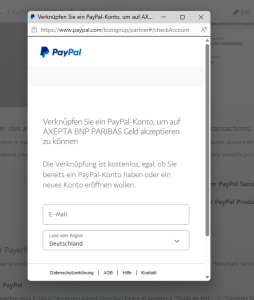
Il est normal que les pages Paypal s'affichent en allemand.


Image Added


Info
 For more details visit https://www.paypal.com/.