
| Tip | ||||||||||||
|---|---|---|---|---|---|---|---|---|---|---|---|---|
Release History
|
| Table of Contents |
|---|
Introduction
Axepta BNP Paribas payment platform accept payment orders, process the data and carry out the merchant’s payment transactions in a secure way.
...
This document fully describes how to install the cartridge and integrate it into the online store. It is required for the merchant to first contact Axepta BNP Paribas and request an account for the integration to work properly. Axepta support provide a testing and production accounts for the merchant.
...
This cartridge is available for the 2 versions of SFCC (SFRA or Sitegenesis)
Compatibility
Axepta integration cartridge was certified with the version of Salesforce Commerce Cloud : currently API version 22.10, Site Genesis version 104.1.3 and SFRA version 5.3.0. It is typically backward compatible with older versions since it uses common and stable methods accessing the Customer, Order and Payment system objects.
Currently, SFRA version 6.x and above are not supported.
Component Overview
Functional Overview
Bussiness Manager Extenstion for Axepta
...
The cartridge offers the merchant the possibility to perform partial or total refund for an order, by accessing the Axepta Module > Manage Orders > Order Details screen. This operation enables the merchant to credit funds back to an end-user following a previous debit and it is always linked to a succesfull payment or capture transaction.
Uses Cases
During the checkout, the customer can select to complete the process using one of the available payment methods :
...
Axepta cartridge is developed based on en_US locale but it can be configured in any locale needed. Also, the cartridge doesn’t perform any request of PCI sensitive information
Compatibility
Axepta integration cartridge was certified with the version of Salesforce Commerce Cloud : currently API version 22.10, Site Genesis version 104.1.3 and SFRA version 5.3.0. It is typically backward compatible with older versions since it uses common and stable methods accessing the Customer, Order and Payment system objects. Currently, SFRA version 6.x and above are not supported.

FLOA PAY
General Information
FLOA Pay allows a merchant to offer 3X, 4X, 1XD or 3XD installment plans for customers during checkout. During the first step FLOA Pay checks the customer for eligibility for chosen installment. Then, in case of positive result, FLOA Pay redirects the customer to FLOA Pay Hosted Payment page. A merchant can be configured on FLOA Pay side for AUTO Capture or for MANUAL Capture. In case of AUTO Capture, FLOA Pay does not expect capture from the merchant. FLOA Pay does capture automatically based on the authorization. In case of MANUAL Capture, the merchant needs to call Capture API. After a credit check, FLOA Pay assumes the entire customer's payment default risk for each transaction. The merchant receives full amount of the installment from FLOA Pay after capture.
...
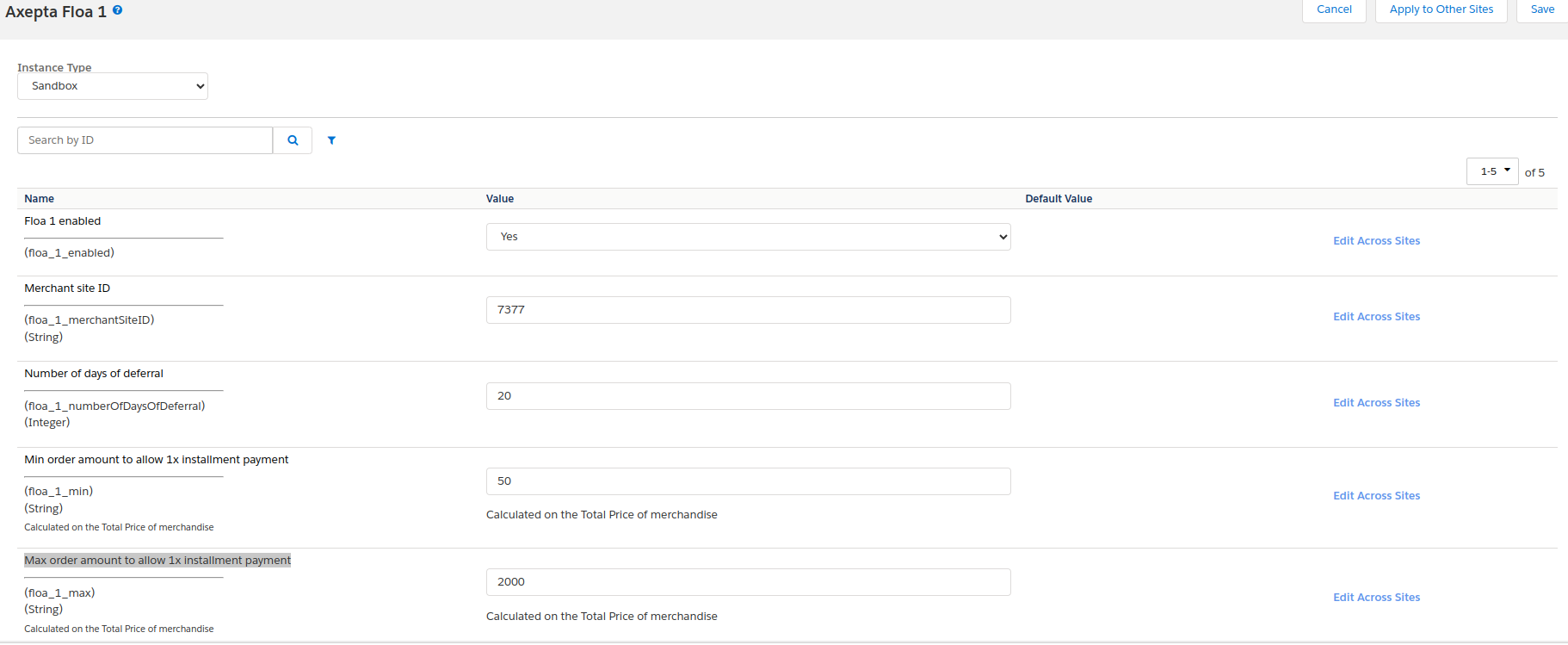
- floa_1_max : Max order amount to allow 1x installment payment.
Axepta Floa 3
Follow this documentation to find out your test merchant site ID : Tester FLOA - Documentation Axepta BNP
...
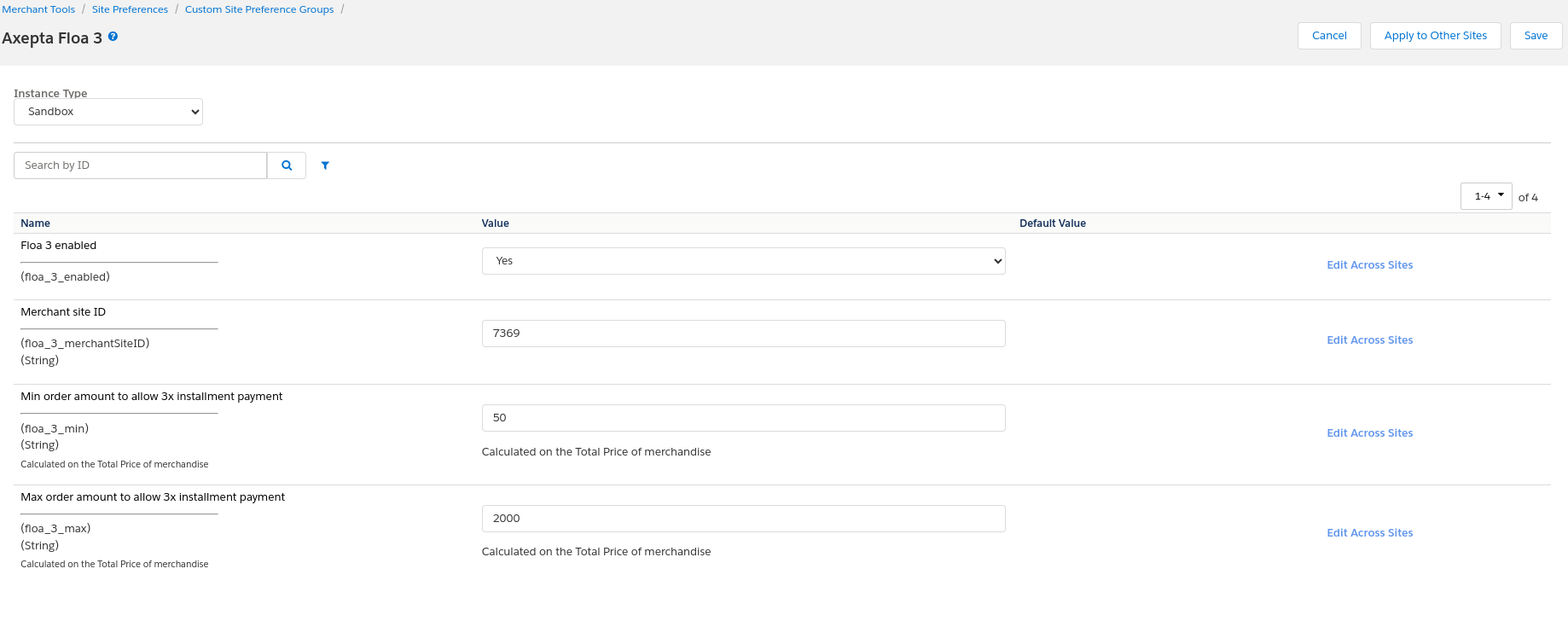
- floa_3_max : Max order amount to allow 3x installment payment.
Axepta Floa 4
Follow this documentation to find out your test merchant site ID : Tester FLOA - Documentation Axepta BNP
...
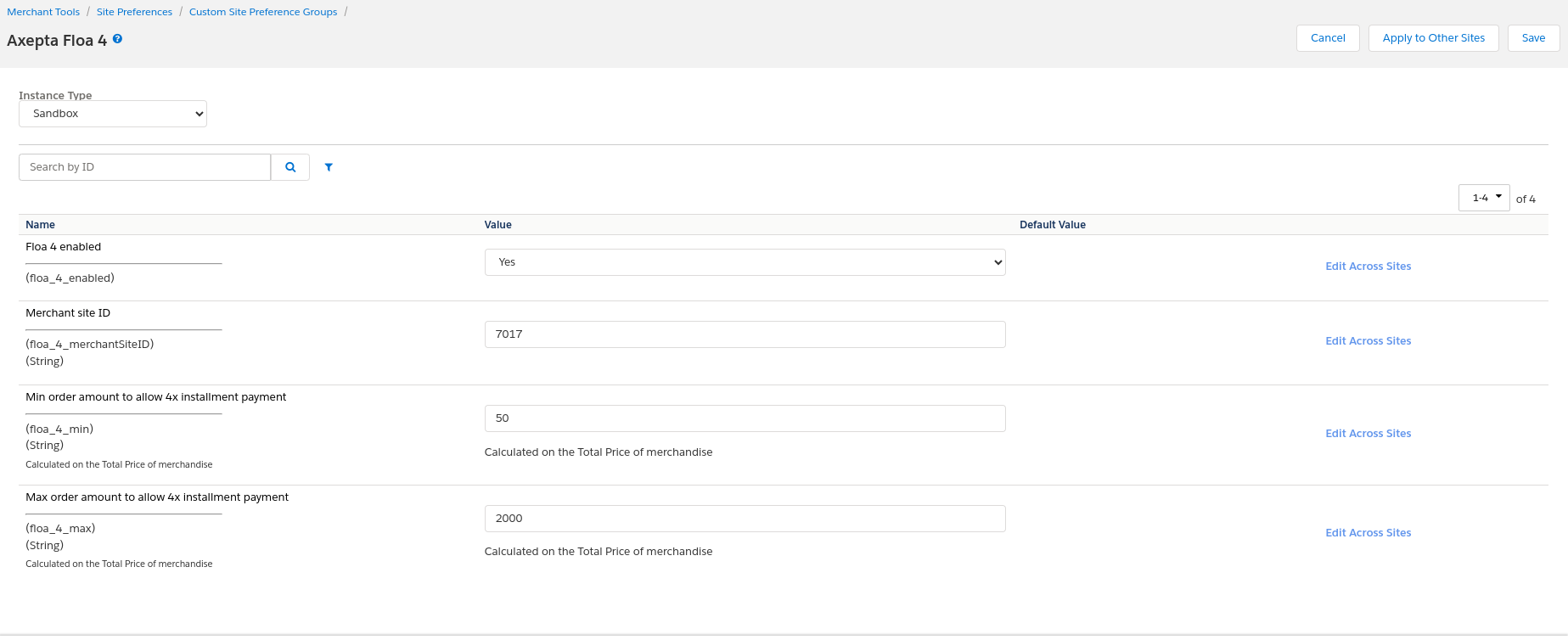
- floa_4_max : Max order amount to allow 4x installment payment.
Storefront Functionality
Display FLOA in the Checkout
...
5. Click the Pay for an order button. You will be redirected to the SalesForce confirmation page.
PAYPAL
General Information
PayPal is one of the world’s leading eWallets for e- and m-Commerce. Around 179 million active members in over 200 countries pay for their online orders with PayPal. Customers can pay by card (American Express, Diners Club, Discover, MasterCard, Visa). Along with the above payment methods, PayPal PLUS offers purchase on account and purchase by instalment.
...
Import the system-objecttype-extensions.xml file. 1 new preference group should appear in Merchant tools > Site preferences : Axepta Paypal axpPaypalUrl : URL to initiate a PayPal payment in the Payment platform (default : https://paymentpage.axepta.bnpparibas/paypal.aspx)
Storefront Functionality
Display PayPal in the Checkout
...
3. Log in, select your payment method, and make the payment. You will then be redirected to the SalesForce confirmation page.
Cartridge Installation-SFRA
Installation
Under SFRA, 3 of the cartridges will be used :
...
The permissions for the BM module must be set for every role you want to give access. This is done in Administration > Roles & Permissions > [your role] > Business Manager Module : select the Axepta module
Cartridge Installation-Site Genesis
Installation
Under SiteGenesis, 3 of the cartridges will be used :
...
This import will add the configuration elements, as well as the various jobs, services and extensions of system-object.
Configuration
Configuring Site Preferences
General configuration items can be found in Site Preferences (Merchant Tools> Custom Preferences> Axepta Configurations ). It contains the following elements:
...
See 3DSV2 and frictionless for more information.
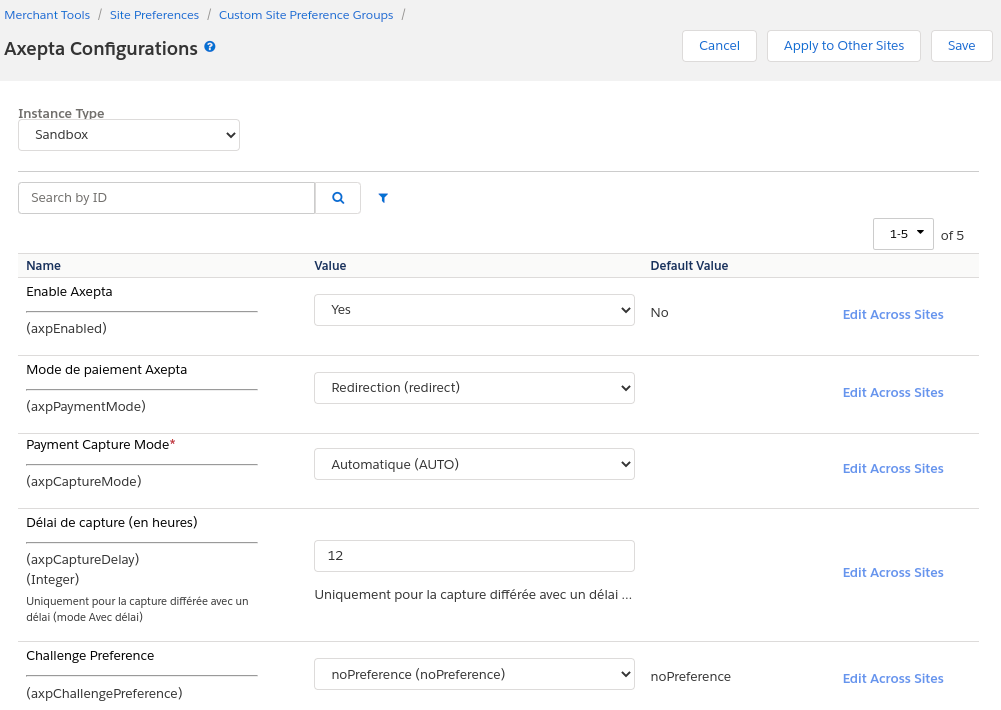
Configuring Custom Objects
Account configurations depend on the currencies activated on the site. After activating one / more currencies on the site, it is possible to create the necessary configurations. For this, a custom interface is available in: Merchant Tools> Axepta Module> Accounts Configuration . In this interface, the activated currencies are listed, with the possibility of modifying / creating these configurations.
...
In order for the capture jobs to function correctly, it will be necessary to define one / more execution sites for them via the context of the steps.
Transaction management
With the cartridge comes an Axepta transaction management interface. It can be found in Merchant Tools> Axepta Module> Manage Orders . When you click on the order ID, you will find the details of this order / related Axepta transaction.
Details of transactions
On this page is the general information of the order (different SFCC statuses). Information on the various Axepta calls made for the order is also available. On the left part Order payment operations , we find the list of calls, with the type of call made, as well as the status. We therefore have the operations PAYMENT, CAPTURE, REFUND, CANCEL ... On the right, we find the details of the return of service calls (so all the details of the transaction made). From this page, it is also possible to cancel or refund the payment.
Cancellations
To make a cancellation, the order must meet the following criteria :
...
If the order meets these criteria, a “REFUND PAYMENT” button is available at the top of the page. When this button is clicked, a first call verifies that the order has no capture (via the axepta.inquire service , then a call is made to the axepta.reverse service , which will close the payment and cancel the order. A “CANCEL” transaction line will therefore be added to the list.
Refunds
To make one or more refunds, the order must meet these criteria:
...
If it meets these criteria, a field and a button are added to the top of the page. By default, the value entered is the total of the order. You can enter a partial refund (therefore a lower amount) if necessary. On validation, a call to the axepta.capture service is made, and a transaction line is added. It will be either “PARTIAL REFUND” or “REFUND” depending on the amount.
Capture
As indicated previously, 3 capture modes are available :
...
This capture mode requires a call to the capture endpoint. These calls are managed by the Axepta - Capture Orders job. This job runs on Axepta orders having a “SHIPPED” status, and not being captured. It then makes a call to the axepta.capture service on these commands . If the feedback is positive, the order is marked as Captured and PAID.
Testing
The test cases are built to cover both the storefront functionality, from an end-customer’s point of view, as well as business manager functionality, from a merchant’s perspective.
...
The tests for this mode are available in the file int_axepta_sfra/test/integration/tests/Checkout_Iframe_test.js or int_axepta_sitegenesis/test/integration/tests/Checkout_Iframe_test.js
Operations, Maintenance
Data Storage
Custom Objects
...
In the event of problems with the integration, missing features, etc. please contact the Axepta Team at https://axepta.bnpparibas/contact-us/ or BNP Paribas Team or your Axepta account manager.
User Guide
Roles, Responsibilities
The store administrator is responsible for checking the configuration of the Axepta Merchant Account in the Axepta Extranet. Admins should regularly check all the payments received to ensure they contain the expected data (currency, amount, customer information, etc.).
...
In this payment method, the customer remains on the e-commerce site. The payment method is entered in an iframe when clicking on the "Place order" button.
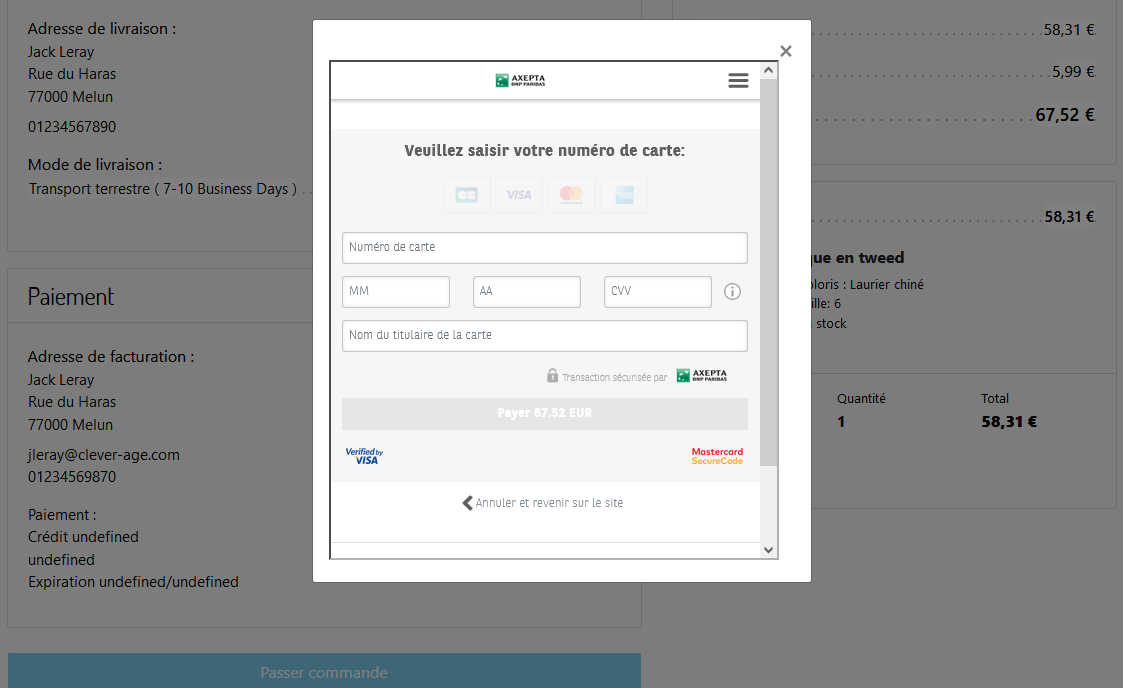
Description of available payments methods
| Table Filter | ||||||||||||||||||||||||||||||||||||||||||||||||||||||||||||||||||||||||||||||||||||
|---|---|---|---|---|---|---|---|---|---|---|---|---|---|---|---|---|---|---|---|---|---|---|---|---|---|---|---|---|---|---|---|---|---|---|---|---|---|---|---|---|---|---|---|---|---|---|---|---|---|---|---|---|---|---|---|---|---|---|---|---|---|---|---|---|---|---|---|---|---|---|---|---|---|---|---|---|---|---|---|---|---|---|---|---|
| ||||||||||||||||||||||||||||||||||||||||||||||||||||||||||||||||||||||||||||||||||||
|






...