

Het kaartbetaalformulier wordt gebruikt wanneer een handelaar een vereenvoudigde en veilige betaaloplossing voor kaarttransacties wil aanbieden.
Deze methode is ideaal voor e-commercewebsites die een snelle betaaloplossing willen integreren die voldoet aan de veiligheidsnormen.
Samenvatting
The card payment form is used when the merchant wants to offer a simplified and secure payment solution for card transactions.
This method is ideal for e-commerce sites that want to integrate a fast payment solution that complies with security standards.
| Table of Contents |
|---|
1.
Key Advantages- Optimized User Experience: Provide your customers with an intuitive, secure, and responsive payment interface
Security and Compliance with Standards: Comply with current regulations through Axepta BNP Paribas's management of customer sensitive data, significantly reducing your responsibilities PCI-DSS compliance and costs related to PCI-DSS compliance.
Flexibility: Allow customers to pay with various cards
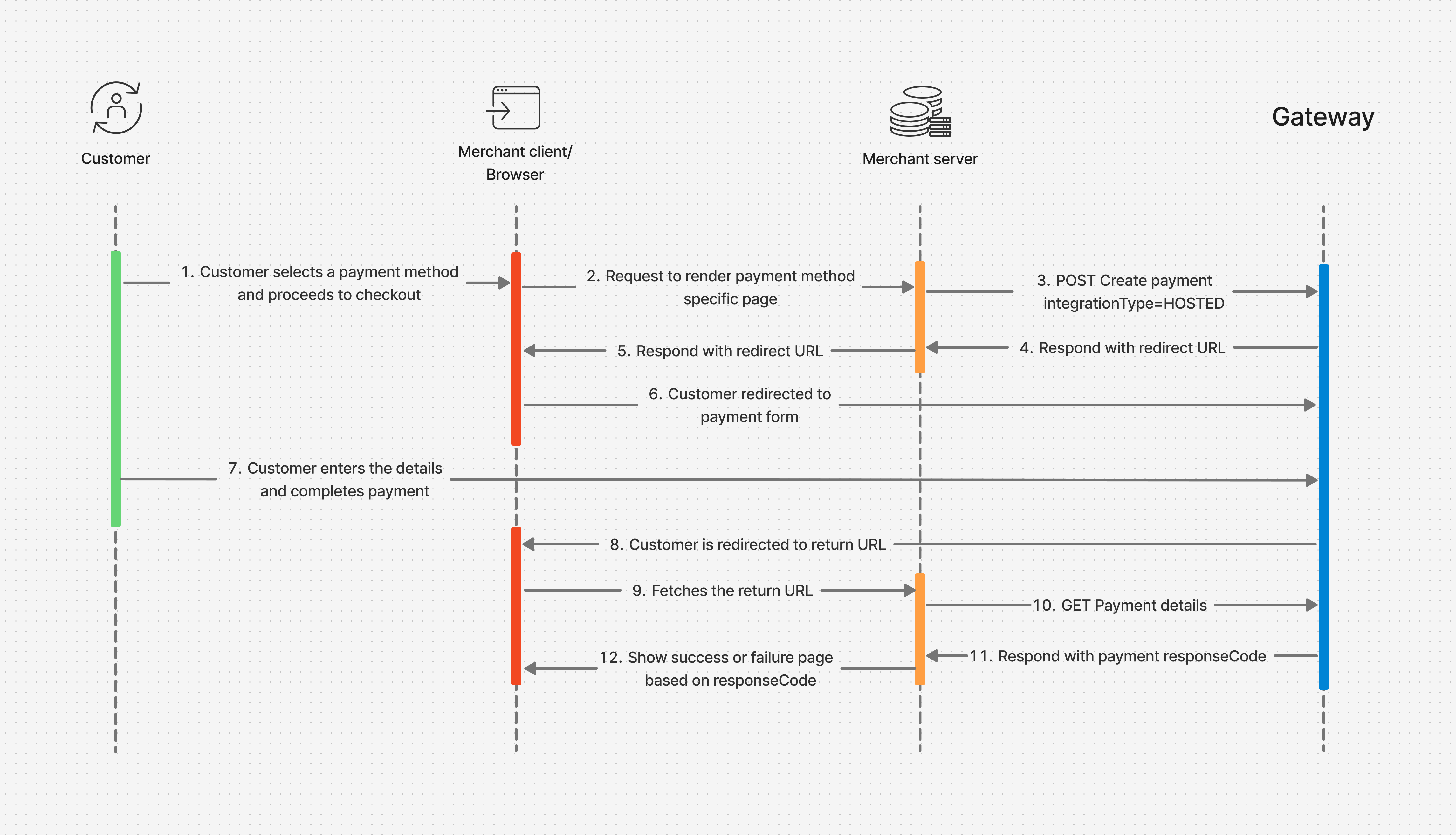
2. Payment Flow
Belangrijkste voordelen
- Geoptimaliseerde gebruikerservaring: Bied uw klanten een intuïtieve, veilige en responsieve betaalinterface.
- Veiligheid en naleving van normen: Voldoen aan de huidige regelgeving via het beheer van gevoelige klantgegevens door Axepta BNP Paribas, waardoor uw verantwoordelijkheden en kosten voor PCI-DSS-naleving aanzienlijk worden verminderd.
- Flexibiliteit: Laat klanten betalen met verschillende kaarten (bijv. Visa, Mastercard, Bancontact).
2. Betaal Flow
De klant voert de betaling uit in uw webshop:
The customer proceeds with payment on your online store:
Your frontend requests the payment page from the backend.
Uw frontend vraagt de betaalpagina aan bij de backend.
Uw backend doet een betaalverzoek met
'paymentMethods.integrationType=HOSTED'
naar Axepta BNP Paribas.
Axepta BNP Paribas
reageert met een HTTP 202-statuscode en een doorverwijzings-URL naar uw backend.
Uw backend zorgt ervoor dat de browser de klant doorstuurt naar de doorverwijzings-URL.
De klant wordt doorgestuurd naar het betaalformulier van Axepta BNP Paribas.
De klant vult de betaalgegevens in en voltooit de betaling.
Na afronding wordt de klant teruggestuurd naar de return-URL die u hebt opgegeven bij het betaalverzoek (
urls.return), met depayIdin de URL-parameters.De browser laadt de return-URL, die door uw backend wordt gehost.
Uw backend doet een
GET Payment details-aanroep met depayIdom de betaalstatus op te halen.Axepta BNP Paribas stuurt de betaalstatuscode terug, samen met andere parameters.
Uw backend toont een succes- of foutpagina aan de klant, gebaseerd op de betaalstatus.
3. Aanmaken van een payment-sessie
Your backend orchestrates the browser to redirect the user interface to the redirect URL.
The customer is redirected to the payment form hosted by Axepta BNP Paribas.
The customer enters details and completes the payment.
At the end, the customer is redirected to the return URL you submitted during the payment creation call (urls.return) with the payId in the query parameters.
The browser fetches the return URL hosted by your backend.
The backend makes a payment details GET call with the payId to fetch the payment response code.
Axepta BNP Paribas responds with the payment response code along with other parameters.
Your backend returns a success or failure page based on the payment response code.
(API /payment Swagger Documentation:Create payment )
Simple payment
Payment sessie (eenvoudig betaling)
Technische Verbindingsgegevens
Technische verbindingsgegevens moeten worden meegegeven in de HTTP-headers van de REST-aanvraag
Technical Connection Data
Technical connection data must be passed in the HTTP headers of the REST request:
Content-Type
het type payload; gegevens moeten in een JSON-payload worden meegegeven.
Content-Type: application/json
Authorization data received during theAutorisatiegegevens, ontvangen tijdens de OAuth-v2
-authenticatiestap. Dit omvat het token type
en JSON Web Token (JWT).
Deze moeten worden gespecificeerd in de 'Authorization'-header.
Authorization: <token_type> <YOUR_JWT>
- Idempotency Id
Essential for detecting possible HTTP repetitions.
Idempotentie ID
Essentieel voor het detecteren van mogelijke HTTP-herhalingen.
Gebruik de Use the 'Idempotency-Key' header and generate a -header en genereer een uuid-v4 as the valueals waarde.
Idempotency-Key: "8f35cb16-2f05-4aa1-85cf-b1e41ee7aec9"
Minimale Gegevens Data
Om een betaling te starten, zijn de volgende minimale gegevens vereist:
- Merchant-side transaction identifier
To initiate the payment, the minimum required data are:
- Transaction identifier on the merchant side
- : 'transId'
- Het bedrag en de valuta van de transactie: 'amount'
objectComposed of the data - -object, bestaande uit 'currency'
and - en 'value'
- The amount must always be expressed in the smallest unit of the associated currency (e.g., EUR cents) Customer identification
- .
- Het bedrag moet altijd worden uitgedrukt in de kleinste eenheid van de transactievaluta (bijvoorbeeld EUR-centen).
- Klantidentificatie: 'customerInfo'-object composed at minimumOf the customer's email
- .
- Minimaal het e-mailadres van de klant: 'email'.
It is highly recommended to provide the customer identification on the merchant site - Het is sterk aangeraden om ook de klantidentificatie op de handelaarswebsite mee te geven: 'merchantCustomerId'.
This - Deze data is
essential for the - essentieel voor de 'One-Click'
functionality- -functionaliteit.
Order data- Orderdata: 'order'-object
- At least one of the following two data points: the order number 'merchantReference', or the invoice number 'invoiceId' generated on the merchant site.
- It is recommended to provide both.
- .
- Minimaal één van de volgende: ordernummer 'merchantReference' of factuurnummer 'invoiceId' gegenereerd op de handelaarswebsite.
- Het is aangeraden om beide te verstrekken.
- Return-URL's: 'urls'-object.
- Verplichte adressen voor 3 return-URL's
- : return, cancel, webhook.
Return URLs: object 'urls'
Mandatory addresses of 3 return URLsDesired payment typeGewenst betaaltype: het 'paymentMethods'-object
Hierin moet worden gespecificeerd:
Of de betaling wordt gehost door Axepta BNP Paribas Online of volledig aan de kant van de handelaar wordt verwerkt
: 'integrationType'
Het gewenste betaaltype: 'type'
| Code Block | ||||||
|---|---|---|---|---|---|---|
| ||||||
curl -i -X POST \
  https://test.paymentpage.axepta.bnpparibas/api/v2/payments \
  -H 'Authorization: <token_Type> <YOUR_JWT>' \
  -H 'Content-Type: application/json' \
  -H 'Idempotency-Key: "8f35cb16-2f05-4aa1-85cf-b1e41ee7aec9" \
  -d '{
    "transId": "95330876-67ae-4949-a11c-b9a29257831b",
 	"amount": {
    	"currency": "EUR",
    	"value": 1500
    },
    "customerInfo": {
        "email": "john-doe@email.com"
    },
 	"order": {
    	"merchantReference": "order7811",
        "invoiceId": "invoice10240203569454"
    },
 	"urls": {
 		"return":"https://myProcessingServer.net/myApi/success.php?transId=95330876-67ae-4949-a11c-b9a29257831b",
		"cancel":"https://myProcessingServer.net/myApi/cancel.php?transId=95330876-67ae-4949-a11c-b9a29257831b",
 		"webhook":"https://myBackOfficeServer.net/webhook.php"
    },
    "paymentMethods": {
        "integrationType": "HOSTED",
        "type": "CARD"
	}
}' |
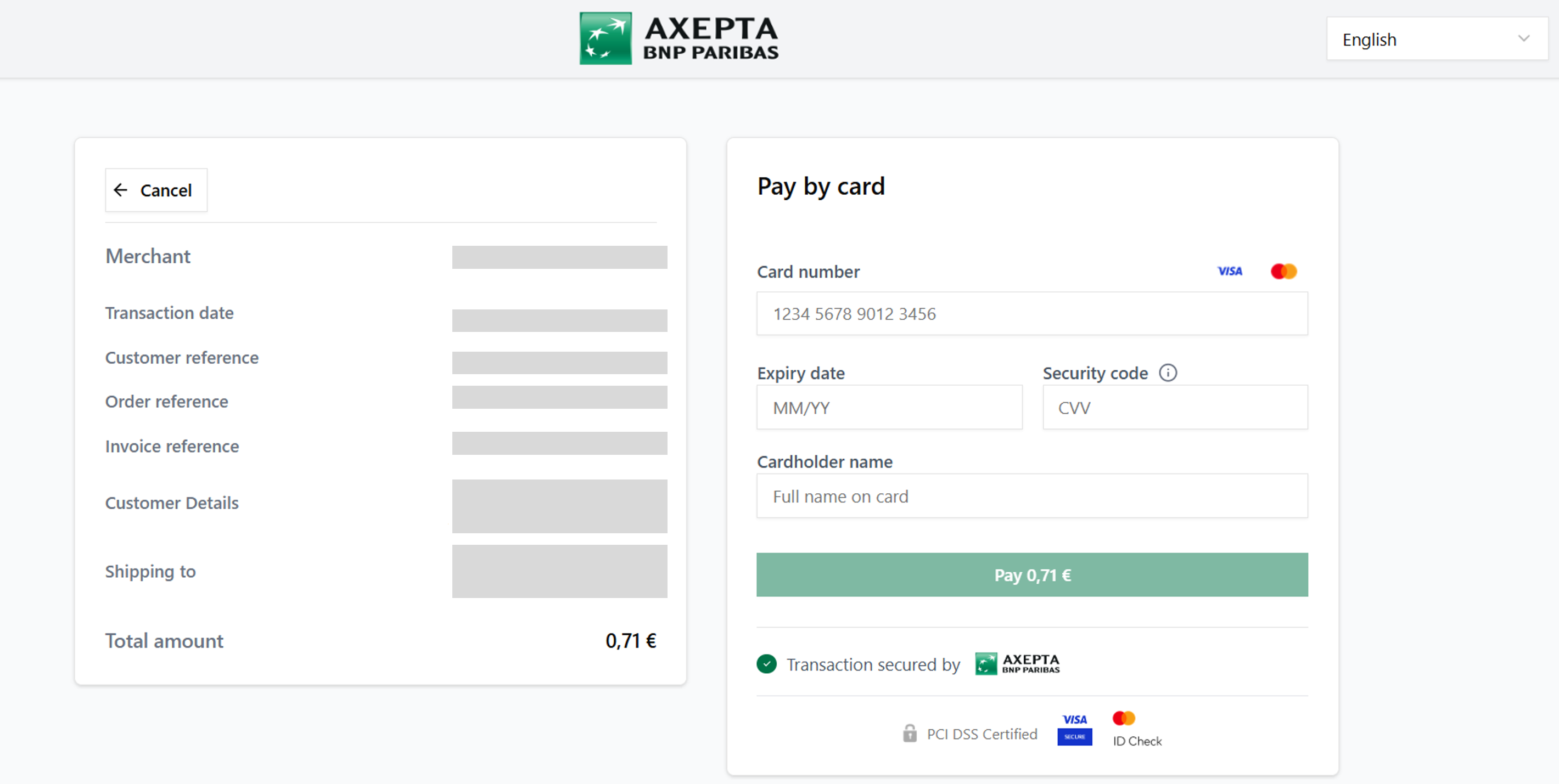
Example of card payment formVoorbeeld van een kaartbetaalformulier
iframe
Paymentbetaling
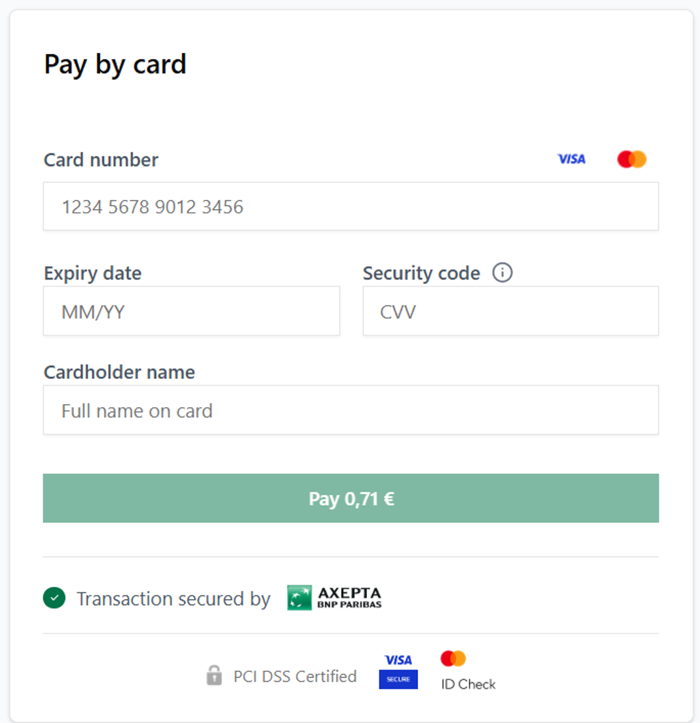
Om de betaalpagina in een aparte iframe te openen, moet je het object To open the payment page in a separate iframe, you need to use the object: 'template'. Set the field gebruiken. Stel hierin het veld 'customField14' with the valuein met de waarde: "iframe".
The Het 'template' object allows you to customize the payment page. -object laat toe om de betaalpagina aan te passen.
Zie de documentatie voor meer details: See the doc: Aanpassing van de afrekenervaring
| Code Block | ||||||
|---|---|---|---|---|---|---|
| ||||||
...
	"template": {
		"customFields": {
	    	"customField14": "iframe"
		}
	},
... |
Example of a payment page displayed in a separate Voorbeeld van een betaalpagina weergegeven in een aparte iframe
4.
RecommandationsAanbevelingen
We raden aan om minstens de volgende gegevens door te sturen:
- Transactie-identifier: de unieke betalingsidentifier
- Betaalbedrag: het bedrag dat de klant moet betalen
- Valuta: de valuta gebruikt voor de betaling
- Klantidentifier: de unieke klantidentifier
- E-mail: het e-mailadres van de klant
- Orderidentifier
We recommend transmitting at least the following data:
- Transaction Identifier: The unique payment identifier
- Payment Amount: The amount to be paid by the customer.
- Currency: The currency used for the payment.
- Email: The customer's email Order Identifier
- (order.merchantReference): The order identifierInvoice Identifier
- de orderidentifier
- Factuuridentifier (order.invoiceId): The invoice identifier associated with this payment
- de factuuridentifier gekoppeld aan deze betaling
Onze complete richtlijnen zijn beschikbaar: Our complete guidelines are available here: https://axeptabnpparibas-docs.redocly.app/
5.
Available card brandsBeschikbare betaalmethoden
6.
Related featuresGerelateerde functies
- Automatische generatie van endEnd-to-End Reference Generation end-referentie (RefNr): Each transaction benefits from a unique automatically generated reference Duplication check: Detect and manage duplicate payment attempts to avoid errors - Activation during your store setup or via a support request
- elke transactie krijgt een unieke, automatisch gegenereerde referentie.
- Duplicaatcontrole: detecteert en beheert dubbele betaalpogingen om fouten te voorkomen. Deze functie is beschikbaar tijdens de configuratie van uw webshop of via een supportverzoek.