
Cas d'usage: Client disposant d'un compte PayPal V1 existant
1. Validation du compte PayPal
Pour commencer, nous vous invitons à vérifier l'état de votre compte PayPal :
- Votre compte est-il toujours actif ?
- Votre adresse e-mail associée au compte PayPal est-elle toujours valide ?
Ces deux éléments doivent être confirmés avant d'entamer le processus de
Use case : Client with an existing PayPal V1 account
1.Validate Paypal Account
In the First place, we invite you to validate the status of your PayPal account - is the account still ‘active’ and is the Email-address of the PayPal Account still valid?
Both should be confirmed prior to themigration.
2. Récupération du PayerID
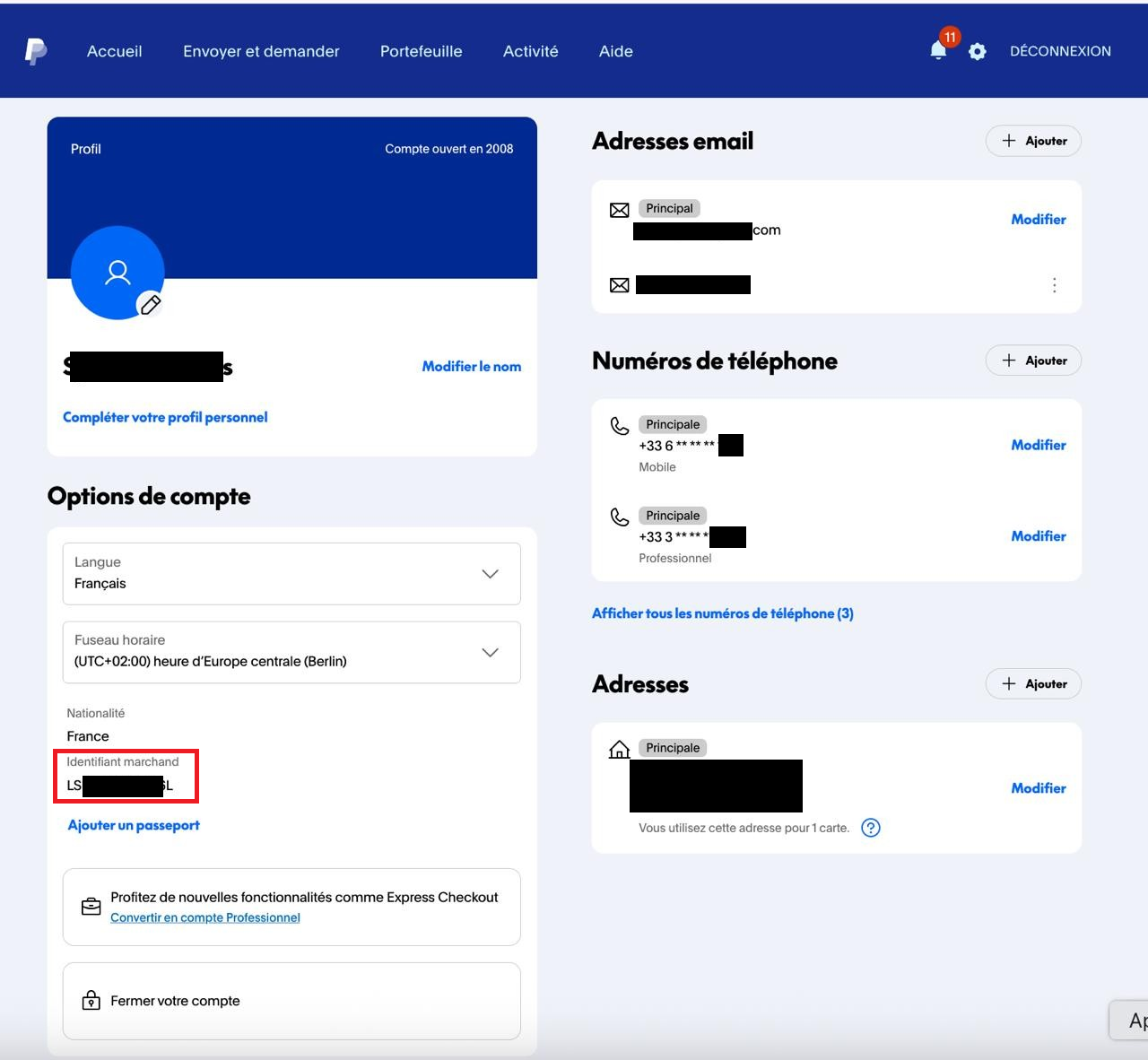
Récupérez votre PayerID depuis votre compte PayPal, puis transmettez-le à BNP Axepta pour la configuration et l'activation de PayPal V2.
PayerID can be found under your PayPal account byOù trouver le PayerID ? Connectez-vous à votre compte PayPal via https://paypal.com/myaccount/settings/
, as follows.
PayerID uniquely identifies merchant in PayPal. The identifier is the same for Sandbox and Production environmentsLe PayerID, disponible dans cette section, permet d'identifier de manière unique le marchand dans PayPal. Cet identifiant est le même pour les environnements Sandbox et Production.
3. Autorisations API
PermissionsDans le cadre de la migration, veuillez accorder les autorisations API requises. Cette opération n'aura aucun impact sur le traitement des paiements via PayPal Classic.In preparation of the Migration, please grant API Permissions. This will not affect processing of PayPal Classic payments!
| Tip | |||||||||
|---|---|---|---|---|---|---|---|---|---|
To grand permissions for Production click the Production link below, login to PayPal using your Paypal login/password and click “Agree”.
|
| Info |
|---|
| For more details visit https://www.paypal.com/. |